People familiar with MS-DOS should be right at home, although some commands are different. (That’s because MS-DOS changed them; it was originally made as a CP/M clone.) One major difference is the absence, in this version, of disk directories. Instead there were up to 16 numbered “user areas,” each its own individual region on the disk, kept separate from the others. CP/M was an amazingly compact system, a single floppy disk could host a half-dozen compilers and have room to spare.
#2: Speeding Up PETSCII
Commodore BASIC was notoriously slow, but also feature-poor. A version of the same Microsoft BASIC that was co-written by Bill Gates himself, and was later ported to MS-DOS as QuickBasic. This page is a collection of different ways to speed up printing PETSCII characters, covering several optimization techniques, one of them, avoiding IF statements, being non-obvious.
It’s been a while since I linked a good solid ultra-geeky hacking video. Poking Technology is really good at this sort of thing. Here he takes apart one of those extremely cheap portable game consoles (1 hour 12 minutes), the kind you might find at the checkout line at Walmart for ten bucks, put logic analyzers on it, run it through Ghidra, and basically figure out how it works.
I find this stuff fascinating. Look, I’m not going to claim everyone will be interested in it, but that’s one of the advantages of running a daily blog that casts a super wide net, if you’re not interested in this there’ll probably be something more to your liking tomorrow. And if this is your kind of thing, take it from me, it’s really going to be your kind of thing. I’ve been munching on this video a few minutes at a time, and I’m still not at the end of it yet, I don’t know where this leads. I hope it goes somewhere where he puts his own code on it, which I kind of suspect he might.
CP/M fascinates me. It was the first real crossplatform OS for microcomputers, and it was also extremely small. It could be implemented in as few as 5KB of memory, and those 5,120 bytes got you a character-based screen, disk access, a file system and I/O support. If it looks like DOS to you, it’s because it was originally created as a clone of CP/M, and so lots of CP/M’s limitations transferred over to DOS, like its single-letter drive names and its 8.3 filename structure. But CP/M was first released in 1974! It was silly for Microsoft to have adapted that limitation too, and as a result until Windows 95 their consumer OSes had to live with the same limitation, when even Commodore 64s could have 16-character filenames. Jeez! PC-DOS/MS-DOS would soon get directory support, which CP/M didn’t get until the under-adopted version 3; until then it had to use a less-flexible system where a disk could be split up into numbered “user areas.”
CP/M being so small, it was also very simple, enough that one person could understand everything going on under the hood, something you really can’t say about OSes these days. That complexity has been used, in recent times, in service of their makers against their customers, to push in all kinds of misfeatures that many people would rather not have.
Nowadays CP/M is a footnote, its founding company Digital Research is a mere bag of property rights owned by Lineo, while Microsoft is worth hundreds of billions of dollars, and it’s very much because of a single decision by people at IBM to go with PC-DOS, later MS-DOS, from Microsoft. IBM offered both OSes, but they sold CP/M for 8086 for $240, several times what they sold PC-DOS for, and that’s why Windows is huge today and CP/M is a footnote. But there is no reason to believe definitely that, if the decision had gone the other way, that we wouldn’t be bemoaning Digital Research’s terrible decisions now instead of Microsoft’s.
But it’s also the case that DR might have turned out differently, while we know Microsoft would become the uncaring behemoth that harmed people’s perceptions of computing since the 80s, and is now propping up OpenAI and trying to shove it into everything. Remember everyone, to always strive to be better than your hypothetical replacement, or someone on a random blog decades in the future might ask aloud if we’d be better off without you.
Is that hyperbolic? It probably is. But the heart wants what it wants, and what mine wants is CP/M for the MOS 6502 processor. Set Side B is a blog about computer entertainment, in all its many forms, and this qualifies in my mind, because it’s not like anyone’s going to be using it do real work. Right?
I found out about it through the (mostly) wonderful blog The Oasis BBS. It’s called CP/M 65, and it was made possible when CP/M’s source was opened in 2022. Wait, maybe I should explain what CP/M is. Sure, it has a Wikipedia page, but I like explaining it.
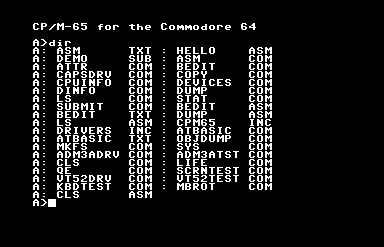
Output of the DIR command on the C64 with the system disk in the drive.
Gary Kildall created CP/M, “Control Program for Microcomputers,” for the Z80 microprocessor, and it became the first widely-used standard OS for home computing. Its importance and influence cannot possibly be overstated: PC-DOS (later known as MS-DOS) was created as a clone of CP/M for the 8086 processor, meaning, the reason .COM files are still technically considered executables, and why we still have drive letters in Windows 11, are both directly because of CP/M.
A case could be made that, if IBM hadn’t made the IBM PC out of standard parts, making possible the huge market for clone machines, it’d still be a CP/M world today, in some way. It was the first standard OS, one where it ran on machines made by more than one manufacturer. Many of the CP/M machines companies, the Kaypros and Osbournes, are gone now, but they had quite a large niche at one time.
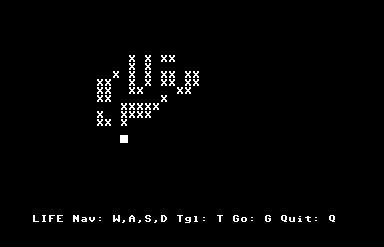
Conway’s Game of Life, for CP/M 65. Because it’s not really a computer until someone’s run Life on it.
Commodore released a CP/M cartridge for the Commdore 64, an amazingly ridiculous and rare package because the C64 used a 6502 processor. The cartridge worked only because it contained a Z80 processor inside itself, and put the 6502 in the system to sleep to do work. It ran much more slowly than other CP/M systems, and on top of that it still had to use Commodore’s 1541 disk drive, a fatal flaw, because it meant that while it could run CP/M software, it couldn’t read the disks that had them, because CP/M’s native disk format couldn’t be read by the 1541’s read heads. (The C128 had a built-in Z80, and the 1571 disk drive that was made for it could read CP/M disks natively, but by that time CP/M was already dying, pushed out by the PC standard and all those clones I mentioned.)
This thing I’m posting about, CP/M 65, has no relationship to that woeful product. It’s a port of CP/M to the 6502 processor. It can’t run Z80 CP/M software. But in all other senses, it is CP/M. What that means is that it has its own BIOS.
CP/M’s BIOS is what allowed its software to run machines made by different manufacturers. The BIOS acted as a translation layer between the hardware and the software. Programs wouldn’t interact with the hardware directly, but instead make calls through the BIOS whenever they needed to use some part of the hardware, like when it needed to access the disk or output characters to the screen. The result was that unless the software was written specifically to take advantage of a computer’s specialized hardware anything extra it had would go unused, but it also meant that a software developer could write one program and, so long as it restricted itself to interacting with the system through that BIOS, it could run on any CP/M machine that could read the disk.
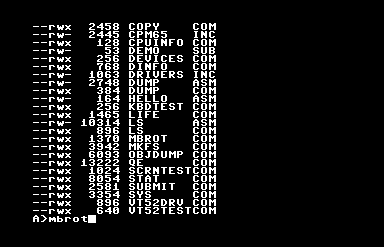
DIR is the built-in CP/M command to report disk contents, but this release contains LS for those with that muscle memory.
CP/M 65 provides such a BIOS for all of its supported platforms, and as a result, while using it will give you a plane-jane, character-mode program, it’ll let you write a program that will run on any of them. Indeed, since this version of CP/M supports relocating executables, its programs can run on a much wider variety of hardware than original CP/M could. You can write a single program that can run on a Commodore 64, VIC-20, BBC Micro, Atari 8-bit, Apple II, KIM-1(!) and, if you can find the incredibly obscure keyboard and disk drive hardware for it or else emulate them, the Super Nintendo Entertainment System(!!).
But on a C64 it shines slightly more than the others, because it has integrated fastload routines, meaning that it gets around the C64’s greatest flaw, its horribly slow disk drive.
So this basically means now 6502s have their own cross-platform version of DOS, or something a lot like it. It has little software, but it does have an assembler, and a version of BASIC, and if you don’t mind writing it on a (pah!) modern computer, you can also write programs for it in other languages.
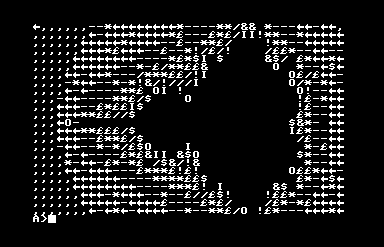
Behold the PETSCII Mandelbrot set!
If you want to try this wonderfully misbegotten thing, something like Frankenstein’s Monster wearing a ribbon, its GitHub is here, and you can find binary release disk images here. The one with the extension .d64 is the C64 version, and it loads right up in the Commodore computer emulator VICE, although I found out it’ll fail to boot unless you turn on “True Disk Emulation” for Drive 8. But it works! It comes with an assembler and BASIC, and a vi-like text editor, an implementation of Conway’s Life, and even a Mandelbrot set plotter. I kind of want to write software for it!
CORRECTION: Silly me, here I was assuming that CP/M 65 itself was a fairly recent thing, but as it turns out it’s been around for around 30 years!
CORRECTION FOR THE CORRECTION: Well the guy working in this very long Youtube playlist (maybe 31 hours?) created it in 2022, which isn’t 30 years ago. Ah well!
Set Side B’s mission statement is to cover three categories of gaming: retro, which let’s be honest is most of what we do; indie, often the province of blogmate Josh Bycer; and niche, which is usually what all the Nintendo stuff gets filed under.
Well, you don’t get much more niche than the category of CP/M gaming. CP/M, or “Control Program for Microcomputers,” is an ancient OS for 8-bit Z80 computers that recently turned 50. Half a century old! While CP/M was very popular in its era and had a lot of software made for it, much of it is obscure and hard to find now, and in histories of home computing tends to get largely overshadowed by Apple and Commodore. It’s a huge vanished scene, but it can be thought of as the DOS before DOS: the OS that would become PC-DOS, then later MS-DOS, was made as a recreation of CP/M’s API for the 8086 family of processors.
If you think MS-DOS software looks primitive then CP/M will appear to you like the freaking Stone Age. MS-DOS had early adapters like CGA and EGA for graphics, but CP/M had none of those. The point of CP/M was that it ran on a plethora of systems, from manufacturers like Kaypro and Osbourne. Many big microcomputers from the age, like the Commodore 64, TRS-80 and Atari 8-bit line, had add-on cartridges with Z80 processors in them so they could take advantage of the huge CP/M software library. Since the point of CP/M, as would be for MS-DOS later, then Windows after that, was cross-compatibility, it had to run on all those systems. But it didn’t have the IBM PC’s standardized graphics hardware, so little, if any, CP/M software took advantage of special graphics functionality. It’s all terminal gaming.
A beneficiary of the limited prospects for games on the CP/M was Infocom, which released a number of their early titles, including the Zork trilogy, on CP/M, which wouldn’t be held back by the lack of graphics. But other games were made. Many of these titles were reviewed by the ultra-niche blog TechTinkering, which has a Youtube channel, which uploaded video of a lot of CP/M software, including Mission: Impossible.
Mission: Impossible, by Richard Altman, is one of the category of terminal games, which are often played by printing information on the game state to the screen, then asking the player to enter options from a numbered list. In addition to only rarely having real-time play, because there are no visual or aural components to engage the senses, a lot of the weight has to be borne by the gameplay, which often means it’s pretty difficult. It’s of the class of games that can be found in David Ahl’s BASIC Computer Games books, games like Star Trek, Lemonade Stand and Hammurabi.
Mission: Impossible is a fairly complex game that I don’t yet fully understand. Here, watch TechTinkering’s 19-minute video on it.