I hope you’re ready for something pleasingly pointless. Let’s review.
In 2024 Kayinworks wrote an essay about games as models vs. toys. I’d describe the same dichotomy as simulationism vs gamism. Neither are necessarily bad, but their aims are different. Models, like model trains, take some real-world thing and try to give you its essence. Toys use a real-world thing to lend flavor to a friendlier, more accessible, but in some cases more pandering experience. That’s an oversimplification, it’s a great article, well-thought and full of nuance, but it gets across what you need for item 2. (It also mentions and links to the preposterous and awesome Ginormo Sword.)
Taking inspiration from that essay’s description of changing old games, modernizing their looks and in some cases changing game rules to be more acceptable to players, although sometimes in ways that miss the point of why those old games do things they way they do, plourples created a romhack for NES Donkey Kong that does away with such quaint notions like Mario having a jump that’s only his own height tall. “What’s that? This ruins the entire game? But it’s for Quality of Life!”
White Pointer Gaming is the Youtube channel that examines games and figures out how they pull off the graphical tricks they do, and we’ve linked them to those several times before because they almost always find some interesting tricks to explain, like when the Genesis/Mega Drive pulls off something which looks like scaling, which happens more often than you’d think.
It didn’t have as many different kinds of mappers as the NES did, since its processor had a much larger address space, but it still had a few helper chips included in cartridges through the system’s life. Most of these were essentially co-processors. The most famous one was, of course, the Super FX, which supplemented the unit’s relatively pokey 5A22, providing it enough extra muscle to rapidly draw polygons. But there were other chips, like the DSP line, and the SA-1, which was essentially another processor of the same kind as in the SNES, with its own memory and clocked at a much higher speed, and additional aids.
The use of these chips allowed the SNES to perform feats it was incapable of out of the box. Unlike the NES, which I’m pretty sure wasn’t intended to be used with mapper chips in its initial design, at least one SNES launch title, Pilotwings, used a DSP-1 chip. I have to wonder if Nintendo’s affection for including extra hardware in cartridges played a role in their ill-fated decision to go with cartridge media for the N64?
The Cutting Room Floor’s article on Gameboy Tetris has an interesting fact. The first 25,000 copies sold in Japan, distributed as part of a bundle, had different music! Instead of the now-iconic Russian tune Korobeiniki, a different, somewhat calmer song was used. You can either follow that link and find it on the page, or go here.
Here’s an extra, one last piece of SDGQ 2026 content….
We collect literally hundreds of links in compiling stuff to you, far more to give everything its own post. Here’s a scattershot collection of some of it, we hope that one or two of them might strike your discriminating fancy.
SGDQ 2026 has concluded, having raised $2,400,000 this year for Doctors Without Borders.
Each event there are many runs of possible interest for people—and I must remind you, GDQ is far more than just AGDQ and SGDQ*.
I’ve collected a number of them in the list below. Of course I’ve picked and chosen those I found the most appealing, but they all can be found in their video archive on Youtube. Times gives are the video length, not the length of the run.
For the embedded video, which will become the video included in the social media posts, I choose DingoYabuki’s Ghosts ‘n Goblins arcade run, because it’s short and impressive:
When AGDQ 2027 comes around it’ll be in Atlanta, and I hope to be able to bring you coverage live, on the ground from the event itself! Let’s keep our fingers crossed and our expectations low!
* As an aside, just today GDQ was doing a stream with SNK, which they abruptly cancelled 30 minutes in, when they learned about SNK’s relationship with the Saudi Arabia Public Investment Fund. I’ve heard some people react bitterly that they were going to do the stream at all, but I have to say wow, calling it off while it’s in progress takes rather a lot of guts! I think cutting people like GDQ at the first iota of disapproval might be going too far, that people who realize their mistakes should be cut some slack, especially when it’s so rapid. I say, be prepared for positive action and reward it appropriately.
It’s one of those two times of year again. Games Done Quick, the bi-annual week-long charity speedrunning marathon, begins at 12:30 PM (“Noon Thirty”) Eastern Time on Sunday, July 5th, that’s tomorrow. The day after today, the 250th occurrence of that particular US holiday some people make a fuss about.
This one is SGDQ, where the S stands for Summer. If my recollection is accurate, AGDQ, the one that happens in January, is the home of Awful Block, speedruns while SGDQ hosts Silly Block. You can keep track of them by the first letter: AGDQ for Awful, SGDQ for Silly. Even so though there’s a lot of leakage between the two, and many of the games in Silly Block this time would fit in well in its Awful relative, including the infamous Snoopy game on Commodore 64, Mega Man for DOS and The Legend of Zelda: The Wand of Gamelon.
The schedule is here. A few games of interest, I think, are Castlevania: Symphony of the Night, Kirby Air Riders (only Air Ride mode though), No More Heroes, a couple of games from UFO 50, the SNES version of Ogre Battle, Sonic 3 & Knuckles, Paper Mario: The Thousand Year Door, Vs. Super Mario Bros, Earthbound Beginnings, What The Golf?, The Legend of Zelda: The Wind Waker Randomizer, Gauntlet and Castlevania both for NES, and a naneinf run of Balatro, among many others.
Surprise! Today’s post is about a video from Periscope Films from sixty years ago on the fundamental building blocks of computers from way back then. Right off we’re told that computers no longer rely on primative things like electromechanical relays (gags) or vacuum tubes (wretches). NOW computers are made of TRANSITORS, and we truly are living in the future! (18 minutes)
The cool thing is, while they’re much faster now denser now, and faster, and we have much simpler ways of interacting with them, and storage, both chip and magnetic, hold much more data, and each of these things has improved by a factor of billions or even trillions, computers still basically operate on these same principles.
This video mostly concerns itself with explaining how basic computer circuts are made. It makes for fairly dry viewing if you don’t know anything about electronics or circuit diagrams, but maybe it’ll be interesting anyway, from a historical perspective.
Namco, now the merged entity Bandai-Namco for some reason I can’t fathom but oh well, has certainly gone back to the arcade collection well a lot of times. Many of their games are genuine pop cultural phenomena, either/both in their native Japan and in other countries. It was US sales that propelled Pac-Man into being perhaps the most enduring legacy of the golden era of arcade games.
It was for the original Playstation that Namco first started rereleasing home compilations of their classic-era arcade hits, in the six well-known and respected Namco Museum titles. But then their rereleases became rerereleases, and then, rerererereleases. So many collections, so many trips around the block, so many recreations, so so many. Going by the series’ Wikipedia page, the most recent entries have been for modern home consoles, the Evercade handheld retro console, and even a standalone unit.
I would despair of ever understanding all the Namco Museum releases, but for the tireless efforts of Mythic Resonance on Youtube. He has constructed an epic two hour review of every Namco Museum version, called The Namco Museum Museum! It took him over 2½ years to make! And as of this writing it only has 1.9K views, which I view as a darn shame, even if it is, right now, only nine hours old.
I don’t know how many of you have the stamina to watch all of an epic overview of these dozens of game collections, but some of you have got to be up for it, I’m sure. Good luck on retaining your sanity while weathering this massive onslaught of game information!
Now here’s something fascinating I had not heard of before Nicole Express recently wrote about it. Because of a law in Japan it was (maybe still is?) illegal to sell an arcade cabinet without a game in it.
When the market for replacement cabinets opened up, targets for upgrade kits without gutting an old machine to host them, they still had to have some game in them, even if everyone knew its PCB would be just be taken out and thrown away. It was also a way to assure a game center owner that the cabinet worked as advertised, as it could immediately be plugged and tested.
But games cost money to develop and need parts to implement, so these games have to be really simple. So there arose a micro-genre of games, usually a simplified remix of something from the cabinet manufacturer’s back catalog, using ancient processors, minuscule ROM and RAM, and the simplest means of driving the video signal possible, to fulfill this tiny and strange market need.
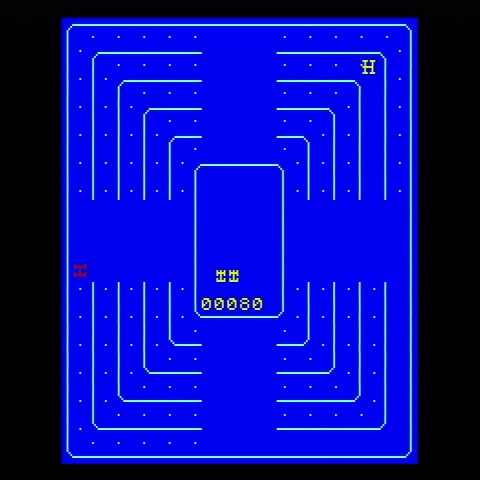
Sega’s Dottori-kun (image from linked site).
Nicole so far covers three such games: Sega’s Dottori-kun is a remake of their classic arcade game Head-On (remade before by Atari as Dodge ’em), a simple dot-eater where the player’s surrogate is a car that can only drive around a track one way. Taito’s Mini Vaders is a series of Space Invaders challenge boards, but with no enemy shots or sound. And most recently Konami’s Target Panic is a kind of fast reaction target shooting game, but using a joystick instead of a light gun.
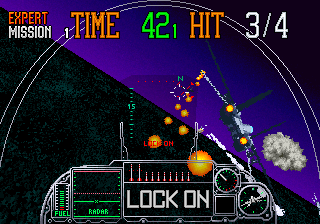
Dottori-kun, a silent blue-and-white remake of a 1979 arcade game, was, via Sega’s Aero City cabinet line, a game they were publishing the year that also saw the release of their Super Scaler extravaganza G-LOC.
G-LOC, Dottori-kun’s sibling. (Image from Mobygames)
Nicole goes into detail about each of these games, possibly the most attention any of them has gotten outside of their creation, including their internals. She really knows her stuff, and dives into the implementation of each game. All three run on Z80s or variants. Only one of the three games, Mini Vaders, accepts coins. All three articles make for fascinating reading, at least to my fevered mind, so please click through
It’s not well known (but is becoming better known) that the NES’s PPU graphics chip has an unutilized feature. It has a way to pipe graphics into it from another PPU, giving the two chips a combined output. The Famicom and NES both ground out the pins that would allow using this interesting feature, making it impossible to use without desoldering and some other changes, but Youtuber decrazyo performed the necessary modifications (5 minutes) and thus made a system capable of hardware parallax scrolling, 128 sprites with up to 16 per scanline, and additional color flexibility.
The existence of this feature implies that the PPU was intended for greater things at some point in its development. A lot of the limitations of classic hardware end up being due to economic and complexity tradeoffs prevalent at the time of their making. I find it intriguing to imagine the PPU’s chip designers anticipating a future where it could have been daisy-chained like this.
It’s been going around the gaming bigsites (PC Gamer, Time Extension, Kotaku, Eurogamer and others) that due to a quirk of US copyright law Richard Garriott, who begin the Ultima series in June 1981, may finally be getting back the rights to his now-ancient series from the corporate behemoth, Electronic Arts, that has long owned them.
The details of the story are that this only involves the copyrights, not the trademarks. But trademarks are different from copyrights, they must be continuously defended and expire if not utilized. Every so often Electronic Arts attempts to do something new with the Ultima name, but none of them usually turn out that successful. The sole remaining example of classic Ultima is the venerable MMORPG Ultima Online, older than World of Warcraft, even older than Everquest. It’s possible that EA could use its unbelievable continued existence as a pretext to keep hold of the Ultima trademark, but UO is incredibly ancient itself nowadays and doesn’t have the large userbase it once did.
I have no love for the monstrosity Electronic Arts has become, the memory of their enlightened early years under Trip Hawkins fading after decades of stagnating sports lines chained to big leagues licenses, and piles of brown and gray military shooters. They sit on countless classic computing properties, doing nothing with them while people who fondly remember them age and die off. Yet I choose to believe this isn’t out of spite, more that they can’t be assed to do anything with properties that aren’t gigantic sellers.
Ultima is one of the few cases where a piece of their gigantic lucite block of IP shows a crack that could be broken away. Richard Garriott has maintained his wealth from the time of Ultima’s success, and may have the resources to fund a revival. Whether it would be successful… I can’t say. Garriott has tried making multiple games since leaving behind Ultima with varying degrees of quality. His Tabula Rasa from NCSoft, from nearly 20 years ago, didn’t do well; I’m not apt to hold that against Garriott though, considering how badly they treated City of Heroes.
Every so often Richard Garriott comes up with some new concept, but truthfully it’s been a while since he’s made waves. I personally sat at a talk he gave at DragonCon a few years ago where confidently held forth on the direction that he saw gaming going, but then failed to go. I’ve tried Shroud of the Avatar: Forsaken Virtues recently, he was involved with it but has long since left it. I bounced off. I’d like to give him the benefit of the doubt, but Garriott’s most recent project involved NFTs, which seems like a huge danger sign.
My personal opinion is that Richard Garriott should immediately approach Digital Eclipse, developers of the terrific remake of Wizardry: Proving Grounds of the Mad Overlord, and together start making something along those lines. Richard, if you’re somehow reading this, please consider it! They do great work. Maybe something involving Ultima III, IV or VII? Any of those would be amazing and could open up this long-neglected series for a new generation of players.
Anyone else out there have personal experience with how amazing this game was?
I’ve heard that Garriott is going to be at DragonCon again this year. I plan on reporting on it on-site. Despite what you might think from what I wrote two paragraphs above I’m still rooting for him. Ultima is the most shamefully neglected classic RPG franchise out there right now, and I’m excited to think that it might make a comeback, no matter how unlikely that might seem right now. I didn’t think Wizardry could make a comeback either! Let’s all clutch our ankhs tightly and hope.
MUDs, and their sibling games MUCKs and MOOs, now almost forgotten except among a rapidly-aging userbase, used to be the biggest gaming draw on the internet. When MMORPGs became big, it was largely by using the lessons of MUDs and applying them to a 3D graphical world with action gameplay. Everquest (admit it, you haven’t heard that name for a while) and World of Warcraft would never have become big if it hadn’t been able to stand on the shoulder of MUDs. And now, with WoW’s memory receding in the minds of many users, I think it’s well time to go back and find out what the originals were all about.
That Antiquarian article is pretty amazing. In the original MUD, if you got enough experience points you could become a wizard, basically a moderator yourself. If you killed another player they had to start over from scratch, and you got 1/24th of their experience points. Other ways to gain points was to find treasure and drop it into the swamp. Once treasure was swamped it was gone until the next server reset, which only happened when nearly all the treasure was so disposed. While you could find and use weapons, there was a limited number of most of those in the game so most players had to be satisfied with basic stick weapons.
But despite these limitations, players managed. Wizards could crash the game easily (there was a command specifically for doing so!), so mostly they didn’t. Customs were decided on; it was improper to kill a player more than two levels below yours. The game continued, and players largely came up with their own solutions to social problems.
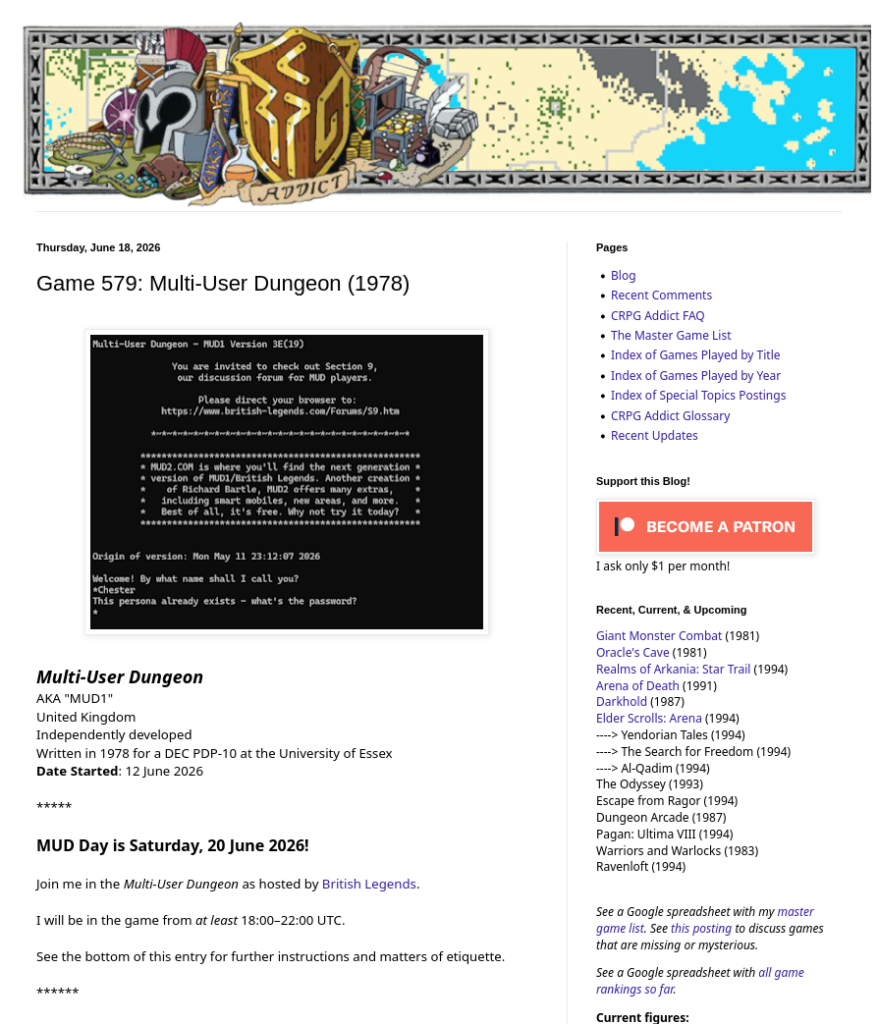
The CRPG Addict explains that the original MUD is still in operation at british-legends.com, and that you can even join him there to play today! Times are in his post.
The Game Display tells us of an interesting kind of secret in Super Mario World that few know about. Once in a while in that game, a 1-up Mushroom just randomly seems to appear, flung into the air, sometimes in such a way as to seem to encourage you to leap off a cliff to go after it. Here is their video explaining what’s going on with those (9½ minutes):
There are some locations in a few levels that have four invisible spots in the background that can detect your presence. If you touch the four in order, the extra life appears. They’re found throughout the game, and they’re supported in code to the extent that, if you find one in a level, the game sets a flag for that level so it won’t appear again in that play session. You have to exit your game and load it back up again before you can get another extra life by this means from that level.
Many of these locations are arranged so that to trigger them in order, you’ll have to move in a loop around some location. This is similar in concept to the stakes in Super Mario 64 that, if you run around them a few times, cause them to generate coins to collect. Another kind of weird secret in a Mario game. I feel like Shigeru Miyamoto must have been lying awake at night brainstorming ever more obscure things to put into them.