
Official Mario Paint Videotape

Nintendo’s announced that Mario Paint has been released on Switch Online, a movie that I modestly point out that I called some time ago, although I hoped they’d offer an export option that would let you make easy use of your creations, although one can use the Screenshot button to save your creation probably. It’s not the subject of today’s post, but their announcement’s pretty entertaining, so here it is (4 minutes):

The announcement mentions that one can use the restore states built into the emulator to save your work, which is at least better than the single save file available in the cartridge, or “saving” your work to VHS tape as the manual suggested. Another thing mentioned in the announcement is that, not only can people use the Switch 2’s Joycons as mice to replicate the function of the SNES Mouse that came with Mario Paint and required it, but in an uncharacteristic bit of generosity, it also supports USB mice when used on the original Switch models.

Mario Party is an interesting piece of gaming history. Without it, Homestar Runner probably would never have happened. Five years ago H*R posted bits of Mario Paint work to social media on Thursdays, which they compiled in this video (4 minutes, sadly not able to be embedded).

That’s two videos already and neither are the focus of this post, so what is? This digitization of an official Japanese Mario Paint tape was uploaded by Jeremy Parish, it’s 31 minutes, and shows off some frankly amazing creations that were made in the days where you had to actually use the mouse to make Mario Paint creations, without resorting to outside tools or memory manipulation. Surprisingly, it also bears the logo of APE Inc. Shigesato’s company that made Earthbound! Here here, it is this this:

One more note about the announcement video! It mentions that Mario Paint songs have been added to the Nintendo Music cellphone app. It also shows off “Title Theme 2,” which actually isn’t in the app, but is revealed to be Totaka’s Song! Maybe it’ll be added at a later date?

On Rescuing Mario Paint Projects From Cartridges

Mario Paint, Nintendo’s weird but beloved image, animation and music creation tool from way back on the SNES, is an anomaly. As with the Gameboy Camera and everything else Nintendo makes that has creation as its purpose, so much love went into it! It has an interface with whimsical characters like the Save Robot and Undodog! There are jolly icons representing the musical notes in the music maker! You can play with the title screen! Totaka’s Song is hidden there! There are randomized startup and erase animations! There’s that fly swatting minigame! Homestar Runner wouldn’t have existed without Mario Paint! I could, and should, go on, but I should more get to the point.

The post needs some visual interest, and Mario Paint’s title screen contains more joy per square pixel than almost anything else in this life, so here!

The point is, Mario Paint was also pretty unsuited to its hardware. I mentioned recently the fact that the cartridge doesn’t actually have enough memory to save all of its data and tries to use data compression to make everything fit, which, due to the nature of compression, doesn’t always work. Also, Mario Paint came with the SNES mouse which it requires, packed in, raising its price and increasing it even more in the aftermarket. And, worst of all: you can only save one image to the cart at a time, and the official supported way to preserve your work, as the Brothers Chaps did with the Homestar Runner link above, is to record it using a VCR.

This sounds like the kind of thing the hacking community could solve, but a rapid Google search (I’m running out of time in making this post) doesn’t turn up anything, even though I’m sure this exists somewhere. Someone on hackaday.io says they’re working on a physical device that could rescue the image off of a Mario Paint cartridge, and would even have an LCD screen built into it so you could see a cart’s image saved onto it, which I’m sure would have blown a young Mark and Matt Chapman’s minds long ago. But the last update was in 2023.

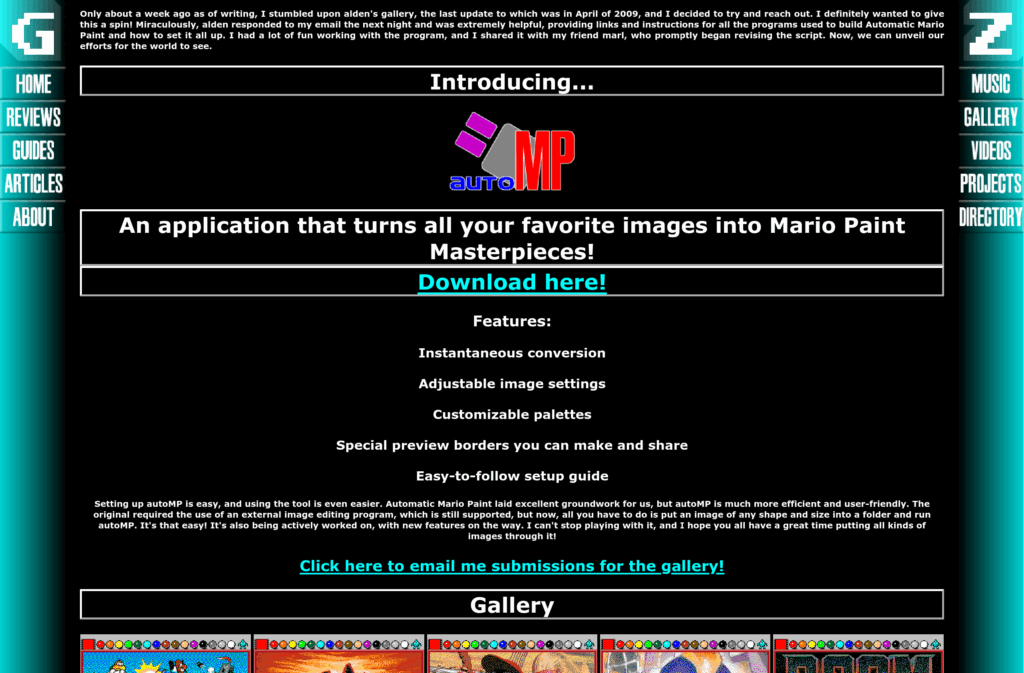
Going the other way, putting outside images onto a Mario Paint save, is not only possible but there’s a tool to do it automatically, hosted, awesomely, on Neocities.

The homepage of AutoMP, which can put images into Mario Paint save data, but not currently get them out. With that good old-time web design aesthetic!

There’s speculation that Nintendo themselves might do something with Mario Paint and the Switch Online service on the Switch 2. The Joycons on that system can be used as mice! But given the direction Nintendo’s been going with Sw2 (“switwo”) it’d probably be a paid feature, and nothing’s even been hinted at yet so who the hell knows. But imagine support for exporting Mario Paint images to your SD card, or onto your smartphone?

Triggering “Data Over Flow” in Mario Paint

A while back I linked to a video showing the obscure “Data Over Flow” error in Mario Paint. Here’s the post, and here’s the video (1 minute):

It occurs because Mario Paint’s SRAM is only 32K in size, which isn’t large enough to store every possible creation. The cartridge uses data compression to squeeze everything in, but the thing about data compression is, it can never be guaranteed to work. Every possible compression format has data that will cause it to take up more space. It’s a fact about the universe we live in. It just is.

If you only use the canvas, or only use the “Animation Land” motion option, then there is enough RAM, but using both in one composition means the software relies on compression to make everything fit, meaning, some kinds of data won’t fit, and that’s when Data Over Flow happens.

But as it turns out, while if you’re using Mario Paint in the way most people it’s unlikely you’ll trigger the error, it isn’t actually difficult to cause it. Creating a random mess of all the colors of pixels in a stamp, then filling the whole canvas and all the animation frames with that stamp, seems to be enough to do it. Mario Party doesn’t use a particular complex compression format. Maybe if it used something lossy like JPEG it might be able to do it, but rather it uses bit-perfect compression. That kind likes repeating patterns and areas of solid color, and doesn’t like what I’m going to call rainbow snow.

So here, watch a user start from a blank project, on real SNES hardware recorded through video capture, and go directly to the Data Over Flow error. Sorry! Our RAM is too sick to contain your masterpiece, it has vomited it all up, please try again (3 minutes):

Mario Paint Data Overflow Error

There is a subtle flaw in SNES art creation tool Mario Paint. It has 32K of Save RAM, which is not technically enough to save an entire project, normal and animation canvases included. The program uses data compression to get everything to fit, and the compression is good enough that most of the time everything can be squeezed in, but such is the nature of data compression that it is not guaranteed to work on all possible data.

What happens when Mario Paint can’t fit everything into its save file? This:

A comment on the video gives purpose to the numbers the robot displays as it counts down. 100-25 is compressing the image; 25-12 is erasing the save RAM, and 12-0 is copying the data into save RAM.