It’s been possible for quite a while to increase the framerate of SNES Star Fox. Even during the SNES’ hardware release period, an updated version of the SuperFX chip that made it’s then-amazing 3D visuals possible was used that doubled its performance, and was used in other games like Yoshi’s Island. And now overclocking and emulation can increase SuperFX performance by much more.
But there’s a problem with speeding up Star Fox this way. The game wasn’t designed that the frame rate can be separated from the gameplay or animations. If you speed up the chip, you’ll speed up everything else in the game too, rapidly making it unplayable.
Some progress has been made recently towards improving the framerate without making it a twitchy stuttery mess. Tyler Loch made a video of his efforts (3½ minutes), and to people used playing Star Fox’s at its original 15fps it’s a wonder to behold:
Because the code has to be adjusted in many different places, there are parts of the game that are obviously incorrect. Falling pillars, you’ll notice, tilt over much faster, bosses move and fire much more rapidly and are more dangerous as a result, and the engine of the player’s Arwing spaceship flashes at a rate that some people may not appreciate. And the video shows off only the first level, because the full game isn’t finishable yet. But much progress has been made! Let us hope Tyler’s momentum holds up through the rest of the project.
White Pointer Gaming is the Youtube channel that examines games and figures out how they pull off the graphical tricks they do, and we’ve linked them to those several times before because they almost always find some interesting tricks to explain, like when the Genesis/Mega Drive pulls off something which looks like scaling, which happens more often than you’d think.
It didn’t have as many different kinds of mappers as the NES did, since its processor had a much larger address space, but it still had a few helper chips included in cartridges through the system’s life. Most of these were essentially co-processors. The most famous one was, of course, the Super FX, which supplemented the unit’s relatively pokey 5A22, providing it enough extra muscle to rapidly draw polygons. But there were other chips, like the DSP line, and the SA-1, which was essentially another processor of the same kind as in the SNES, with its own memory and clocked at a much higher speed, and additional aids.
The use of these chips allowed the SNES to perform feats it was incapable of out of the box. Unlike the NES, which I’m pretty sure wasn’t intended to be used with mapper chips in its initial design, at least one SNES launch title, Pilotwings, used a DSP-1 chip. I have to wonder if Nintendo’s affection for including extra hardware in cartridges played a role in their ill-fated decision to go with cartridge media for the N64?
Mode 0: Up to four independently movable backgrounds, but with some pretty serious color limitations. Mostly got used for title screens.
Mode 1: Up to three backgrounds, two with more colors. The SNES’s most-used mode.
Mode 2: Two backgrounds, with “offset per tile” on one of them that lets the system move columns of tiles vertically by arbitrary amounts. Used for certain special effects, like (along with raster-based scanline placement) the waving flag in Battlemaniacs, Super Turrican 2’s worms and rockets stages and Panel de Pon/Tetris Attack’s rising game boards. Horizontal offset per tile was also possible, but much less used due to the coarseness of the scroll.
Mode 3: Two backgrounds, one of them gets either 256 colors or, using direct color, being able to specify colors without palettes, with 8 bits of RGB value. Often used for high-color stills. Earthbound’s “THE WAR AGAINST GIYGAS!” screen uses it.
Mode 4: Has the high color first layer of Mode 3, and the offset-per-tile effect from Mode 2 for its second layer (which has fewer colors than in Mode 3). Rarely used. Puzzle Bobble uses it for gameplay, to independently shift the playfields from the rest of the gackground.
Mode 5: Two backgrounds, with 16 and 4 colors per tile respectively, but supports high resolution with 512 pixels per scanline. Can’t do transparency (but can kind of fake it with dithering). Notably, the high res menu screens in Secret of Mana use this.
Mode 6: Only one layer, hi-res like the second layer in Mode 5, but supporting offset-per-tile. Often considered completely unused, White_Pointer Gaming found out that Lufia 2: Rise of the Sinistrals does use it during the credits.
Mode 7: The famous mode that supports scaling, shearing and rotation of a single background layer, used for special effects and fancy 3D effects in games like F-Zero, Pilotwings and Super Mario Kart. Supports 256 paletted colors or direct 8-bit RGB color.
Notably though, Mode 7 can’t actually do 3D effects on its own; it has to use another feature called HDMA. It uses a raster effect to change the horizontal scale of the background on each scanline. As it turns out, the calculations to do this on each line are substantial, which is probably why so many games that use Mode 7 to a significant degree use one of the SNES’ coprocessor chips, like the DSP or SA-1, to help the processor out. The video then rounds out with a discussion of the Mosaic function used in such places as the map transitions in Super Mario World and Final Fantasy IV (II).
Elsewhere, Retro Game Mechanics Explained did a 16-part series covering the SNES’ hardware feature in considerable depth.
We’ve linked them before, and more than once, but they’re one of a small number of Youtubers who consistently does great work. Here they look at the effects in a number of games and reveal how the programmers coaxed surprisingly complex effects out of the hardware for each of them. (25 minutes)
The games and effects covered this time:
Art of Fighting on the PC Engine, zooming in and out from the fighters as they approach and draw away from each other
Road Rash on the SMS, which created a startling effect of a road undulating and going over hills for 8-bit hardware
Ranger-X on Genesis/Mega Drive, artillery shots firing into the distance in the background and multi-plane parallax scrolling
The Lawnmower Man on Genesis, SNES and Gameboy, fast 3D virtual reality scenes (well, slower on Gameboy)
Donkey Kong Country 3 on SNES: vertical stretching of a boss
Contra 3 on SNES: rotating both a large boss, the background and the player on the screen at once when the SNES only had one hardware scroll background layer
I’ll admit, I’ve sat on this one for months. After posting about U Can Beat Video Games, I started to worry that this blog might get a bit repetitive if I kept posting about video game walkthrough series, and they take a long time to construct because there’s so many links, but it’s been a while since then, and VG101 has been around for years now.
Video Games 101, a side channel of a Let’s Play channel, covers much the same ground as U Can Beat Video Games. Some of the specific games are different. VG101 is a bit more about entertainment than the specifics of beating games and the strategy involved. Professor Brigands has three “TA” characters that assist him: Scary Gary (covering bosses), Blaze (a surfer who goes over the available items in each game) and Fluff the cat puppet, the most fun of the group, who explains game trivia and history.
I’m just putting it off still further at this point. Here is the intro video to the channel, followed by the list of every walkthrough VG101 has posted to date.
A while back I linked to a video showing the obscure “Data Over Flow” error in Mario Paint. Here’s the post, and here’s the video (1 minute):
It occurs because Mario Paint’s SRAM is only 32K in size, which isn’t large enough to store every possible creation. The cartridge uses data compression to squeeze everything in, but the thing about data compression is, it can never be guaranteed to work. Every possible compression format has data that will cause it to take up more space. It’s a fact about the universe we live in. It just is.
If you only use the canvas, or only use the “Animation Land” motion option, then there is enough RAM, but using both in one composition means the software relies on compression to make everything fit, meaning, some kinds of data won’t fit, and that’s when Data Over Flow happens.
But as it turns out, while if you’re using Mario Paint in the way most people it’s unlikely you’ll trigger the error, it isn’t actually difficult to cause it. Creating a random mess of all the colors of pixels in a stamp, then filling the whole canvas and all the animation frames with that stamp, seems to be enough to do it. Mario Party doesn’t use a particular complex compression format. Maybe if it used something lossy like JPEG it might be able to do it, but rather it uses bit-perfect compression. That kind likes repeating patterns and areas of solid color, and doesn’t like what I’m going to call rainbow snow.
So here, watch a user start from a blank project, on real SNES hardware recorded through video capture, and go directly to the Data Over Flow error. Sorry! Our RAM is too sick to contain your masterpiece, it has vomited it all up, please try again (3 minutes):
As it turns out, as explained by the below video (here’s a direct link, 10 minutes long), the NES and SNES have very similar control setups. Both controller ports have seven lines, and both read them using a shift register that can be used to read arbitrary numbers of buttons. The SNES basically just has more buttons to read.
Due to this, there’s homebrew NES software that’s made to use the SNES mouse, and even emulators that will convert your PC’s mouse into simulated SNES mouse signals, which will be fed into the emulated NES and the software running thereon. (It isn’t all buttons, but it sends the displacement as a binary number.)
The video comes to us from the account of CutterCross, who’s making CrossPaint, an NES art program that uses the SNES mouse. A demo can be gotten from itch.io.
There is a subtle flaw in SNES art creation tool Mario Paint. It has 32K of Save RAM, which is not technically enough to save an entire project, normal and animation canvases included. The program uses data compression to get everything to fit, and the compression is good enough that most of the time everything can be squeezed in, but such is the nature of data compression that it is not guaranteed to work on all possible data.
What happens when Mario Paint can’t fit everything into its save file? This:
A comment on the video gives purpose to the numbers the robot displays as it counts down. 100-25 is compressing the image; 25-12 is erasing the save RAM, and 12-0 is copying the data into save RAM.
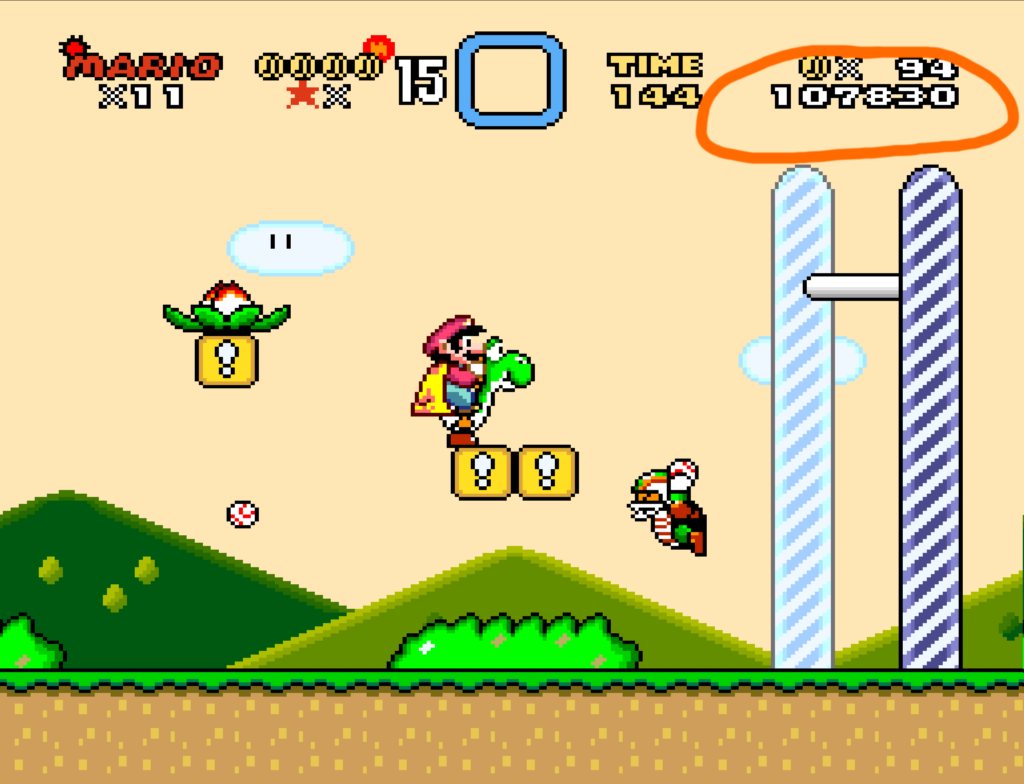
Awesome Mario trivia blog Supper Mario Broth noted on Mastodon that Super Mario World is extremely inefficient in displaying Mario’s score.
There is more information on SWMspeedruns.com, but in brief, SMW stores the player’s score as a 24-bit value as hexadecimal digits, and converts that value to decimal when it’s time to display it. There is no good way to do that that doesn’t involve figuring out the entire arithmetic, but Super Mario World does it particularly slowly: it starts with a copy of the score, then sees if it’s over 1,000,000. If it is, it increases the millions digit of the displayed score by 1, subtracts a million from the work value, then repeats. When it runs out of millions it repeats with the hundred-thousands, and repeats until it finishes with the tens. At least it doesn’t try it with the 1s, seeing as how nothing in the game awards single points!
In a worse-case scenario, with a score of 9,999,990, the code goes through this whole process every frame, consuming up to 8% of the time available for game logic.
What could the game have done to accomplish this better? It could have found out how many of each digit there was once instead of looping and incrementing. It could only figure out the score when the value changes. Or it could save the value as the digits themselves in decimal, just increment them by the right values when its needed, and then copy that figure to the screen. That’s largely what 8-bit games would do.
Even worse, if Luigi is the active character, the game does this twice: it figures out and prints Mario’s score, then it does it again for Luigi’s score, placing it onscreen in the same place.
While printing the score is just one thing the game does each frame, the effect is great enough that complex scores can lag the game, enough that speedrunners take the score into account to avoid it.
This adds to the evidence that Super Mario World development was rushed. It’s already known that a lot of the code in SMW is buggy, allowing for some truly heroic exploits like programming a text editor in SRAM purely by manipulating objects in an early level.
Lists of the best games for various platforms has been a fixture on the internet since it was opened up to the general public. Every big gaming site, those still with us and those gone (R.I.P. Joystiq) feel the urge to make them periodically. After all, they combine several popular article themes: they’re listicles, they’re about video games, and they make definite-seeming yet inherently subjective statements about things that geeks have over-strong opinions about. They’re the ideal hit-getters for pop culture sites really, whether they focus on games or not.
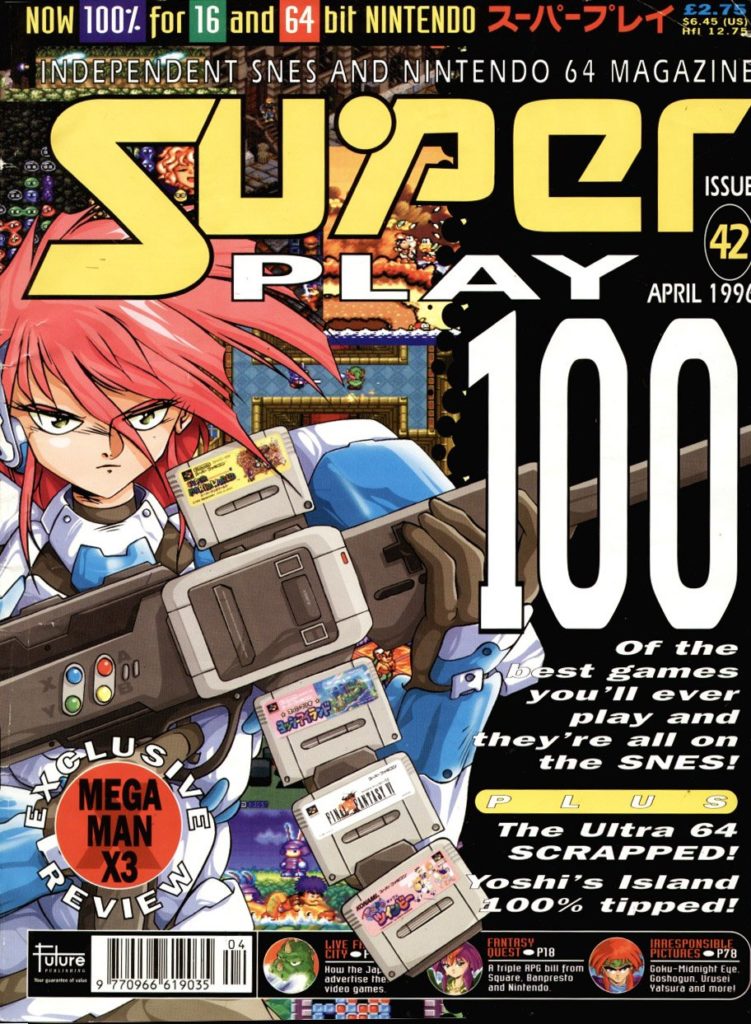
Even in print, these lists weren’t rare things. Super Play Magazine, from the UK, did such a list in April of 1996, which was reproduced in HTML text by the site RVGFanatic in 2010.
Why would such a list interest us now? Well, most of these lists have a strongly US-focused vibe, and the UK had a somewhat different scene than we (me being American) did. So there are a number of very interesting games on the list that generally don’t appear in other places, including a few Japanese ones. And they included SNES Rampart, so I’m automatically kindly disposed to it.
Of particular note, besides Rampart: three Parodius entries, two Micro Machines games, Pop’n Twinbee, Cool Spot, Samurai Spirits, Hebereke’s Popoitto, Spike McFang, SNES Side Pocket, Xandra’s Big Adventure, Pugsley’s Scavanger Hunt, NFL Quarterback, World League Basketball (made by HAL!), The Chaos Engine, Street Racer, Super Smash T.V., Lemmings II: The Tribes (but not Sunsoft’s excellent SNES port of original Lemmings?!), Sensible Soccer, R-Type III, U.N. Squadron, SNES Civilization, Out To Lunch (I hadn’t even heard of this before!), Mickey’s Magical Quest, Cannon Fodder, Plok (the Pickford Bros. rule) and Equinox (also Pickford-made, and also highly underrated).
It’s yet another Youtube video post, but the subject is pretty notable, U Can Beat Video Games at last tackling the highlight of the Metroid series, Super Metroid for SNES, in an epic-length episode. Often big games get split up into multiple parts, but this time the whole game is covered at once. These videos can’t be easy to put together, and I appreciate the effort that goes into them!
As usual UCBVG covers the entire game, including all items and known cheats, and alternate endings. If you’ve ever wondered why GDQ players, hosts and audience ever shout “Kill the animals” or “Save the animals,” the ending to this video should fill in the blanks to an acceptable degree.