Creator of C64OS Talks VIC-II Video Timing

It’s a pretty good run-down of the various weird timing issues of the Commodore 64. Machines at that time had to do all kinds of weird things to keep up the overriding priority of microcomputers of the time: building a consistent video signal that could be displayed on a television. Nearly all machines needed special hardware to do the job of keeping up the display, to give the CPU time to run user programs, or anything at all.

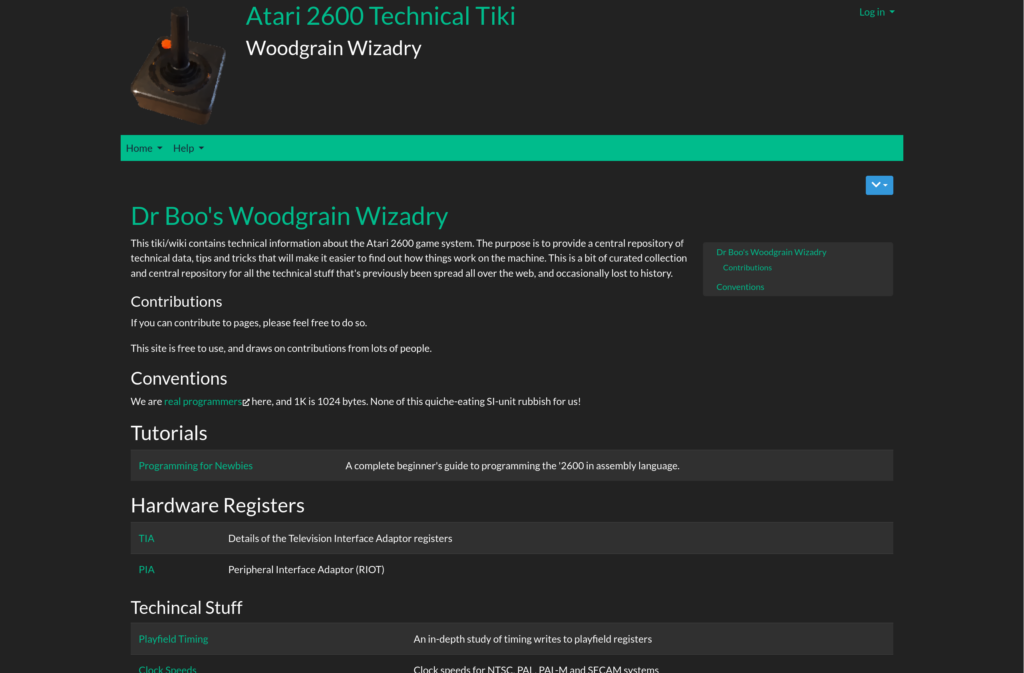
Circuit diagram from the linked article

The C64’s VIC-II video chip is a product of many compromises. The C64 could contain so much memory affordably because it used dynamic RAM, which requires periodic refreshes, and one of the tasks of the VIC-II was to handle that. It also needed access to main memory in order to build the display image.

But both of these actions conflict with whatever the processor needs to do, so the computer is designed to actually put the 6510 to sleep when the VIC-II needs to access memory. This is why, when the screen is blanked, the machine runs a little faster and more consistently, and that’s why the screen is blanked when a connected Datasette is loading programs from cassette tape.

VIC-II and FLI timing (part 1 of 3, c64os.com)

The Ultimate Gameboy Talk

It’s a busy day for me coming up, so here’s one from my list of Youtube links: the Ultimate Gameboy Talk (1 hour 1 minute) by Michael Steil, but you don’t have to watch it on YT, as it’s also hosted on the website of Chaos Computer Club in various formats. The embed below is from Youtube though, since they usually have pretty good embedding:

This “ultimate” talk is ultimately about the hardware, its internals and quirks, and tricks that can be pulled off in it. Sure, it’s very technical and extremely geeks, but that’s pretty much the standard around these parts. Enjoy!

Luxocrates’ Project to Get C64 Commando Music Running On Arcade

I am back from DragonCon, but got hit by a staggering blow from life (which I will not mention the details of here) that’s going to take me a long time to recover from. So in the meantime, please enjoy this 19 minute video in which someone on Youtube describes his plan to get arcade Commando (a.k.a. “Wolf of the Battlefield”) to play Ron Hubbard’s excellent soundtrack from the C64 port.

Arcade Command didn’t have bad music at all, but Ron Hubbard’s score is generally regarded to outshine it. The two hardware platforms are really different: the C64 has a 6502-workalike and the legendary SID chip, while the arcade version used a custom platform. This is a first video in a projected series, so at this point we don’t even know if he’ll be successful. Let’s hope.

An ALU Implemented in K’nex

A lot of your less tech-savvy people look upon computer chips as some kind of magic, at least judging by how Hollywood movies depict hacking. And aliens can take control of computer systems just by inserting part of themselves into some console and sort of glowing while ominous music plays on the soundtrack.

But everything that happens in a processor is the result of simple logical operations: ANDs, ORs, NOTs, XORs and memory, all connected in different ways. And there’s some redundancy in that list: some of those logic gates can be constructed out of the others. The whole point of computers is you can perform billions of simple operations in a second, and complex operations are made out of lots of simple ones. When you’re working with binary numbers, all you need are simple operations.

Because of this, computers can actually be built out of physical parts, without even electricty, they’ll just be much bigger, and slower, and less durable, and may need some motor attached to them. Mechanical calculators have existed since the 1700s, and in the 50s-70s were common sights in offices. Arguably the first general-purpose computers, Charles Babbage’s Difference Engines (Wikipedia), were made from mechanical parts, but they had the disadvantage of not being made out of colorful pieces of plastic.

Shadowman39, an artiste who works in the medium of K’nex, has made a number of devices out of those construction toys, but an ALU, an Arithmetic Logic Unit that can increment, add, AND and XOR two binary numbers, is probably his most “practical” creation. He shows it off in this 15 minute Youtube video:

I want to see an alien that can nebulously control that monstrosity.

This ALU is one part of a larger processor project that’s still being built. I hesitate to call it a “microprocessor,” maybe we should call it a macroprocessor. We wish Shadowman39 the best, and hope he has enough time, energy and parts to realize his wondrous, ludicrous dream.

White Pointer Gaming on Pokemon Gold/Silver’s Real Time Clock & GB Mappers

White Pointer Gaming is another excellent source of retro game hardware information, and a few days ago they uploaded a dive into the specifics of the real time clock used in Pokemon Generation 2 (14 minutes), and as an encore discussed Gameboy mapper chips, a related topic. It seems the clock hardware is on quite a few other GB games as well, as it’s built in to a common mapper chip, but it needs extra power to run the clock, and an oscillator to keep the time accurate. Another game that uses the same mapper, but doesn’t have the oscillator? Pokemon Generation One. Hmmm!

The video mentions that powering the clock and oscillator causes Pokemon Gold, Silver and Crystal cartridges to run out of battery power, and lose their saved game data, much faster than other Gameboy carts with save game battery. Sorry to break it to you; your Pokemon are probably gone by now. Poor out a health potion for Pikachu.

Another interesting fact revealed is, the clock works by recording raw time since the game was last powered on, and the actual date and time are fully updated when the game is started up. If you wait a long time between plays, over 511 days, the timer can wrap around and lose track of how long it’s been.

Switch 2: Storage Issues and Backward Compatibility

A little bit more about the Switch 2? Sure why not?

First thing. I’ve mentioned this on social media, and I want to spread the word as much as I can about it, because this is going to catch people by surprise, and this way as many will find out about it going in as possible. In addition to costing $450 at launch, $500 with bundled Mario Kart World, and possibly more if Trump’s moronic tariffs stick, as stated in the direct, the Switch 2 uses a special incompatible variant of Micro SD cards, called Micro SD Express.

They’ve been out for a while, but uptake has been slow, mainly because their chief benefit is transfer speed, and Micro SD is fast enough for most purposes. But since its use in the Switch’s has been a performance bottleneck, Nintendo went with SD Express, which has the advantage of being faster, but the disadvantages of being both way less ubiquitous, easy to confuse with normal Micro SD cards, and of course, being more expensive. Ars Technica did a rundown, revealing that Micro SD Express cards are actually more expensive than SSDs at an equivalent price-per-gigabyte. It’s not a proprietary format, but consider that it’s possible that the only SD Express cards you’ll be able to find in a store that you buy your Switch from will be Nintendo-branded, and more expensive, it feels like it effectively is proprietary for now.

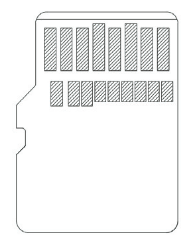
How to tell a standard Micro SD card from a Micro SD Express card? Express cards have an EX logo on their label, and they also have more contacts, as shown by this illustration from an SD Association whitepaper:

It’s true the Switch 2 has much more internal storage than the Switch. But many users will also be bringing their Switch digital libraries with them, meaning it’s possible for that storage to be full on day one. I have a 256 SD in my Switch, and I already have to make hard decisions about what I have installed and what I leave in “the cloud.” That will be my reality as soon as I transfer my eShop purchases to the Switch 2.


I mused a bit on Nintendo’s stating that the Switch 2 will be mostly backwards compatible with the Switch 1, meaning, not everything on the original Switch will work with it. What gives?

Nintendo has a page listing games that aren’t Switch 2 compatible. At first glance, it seems that all the issues are with games that are physically incompatible. Like, the Labo VR Kit isn’t compatible, because the Switch 2 is larger than the Switch 1, and it can’t actually fit into the cardboard goggles. Several other Labo kits are similarly “incompatible.” WarioWare Move It is mostly compatible, but the Switch 2 JoyCons don’t have the infrared camera the right JoyCon on the Switch 1 has. You can still pair Switch 1 JoyCons with a Switch 2 though, so if you have them laying around you can still play IR-requiring games. This also affects Game Builder Garage and some Labo titles.

Ring Fit Adventure and Nintendo Switch Sports use accessories that you insert a Switch 1 JoyCon into, and Switch 2 JoyCons won’t fit into them. And 1-2-Switch has a unique issue: the Switch 2 has more subtle rumble, and it seems a 1-2-Switch minigame uses that rumble to communicate information to players, which could end up being an issue.

But… that isn’t the whole story. It turns out there’s a good list of Switch games that have issues on the Switch 2, software issues, but you have to click through to a couple of PDFs to find out about those. Here’s a list of games with “start up issues,” meaning probably they won’t load. And here’s games with issues once they’re running. These lists may shrink over time as bugs are found and stamped out, but that might take a good while; it took years for the Wii-U to run the WiiWare game LostWinds.

Some notable games on the not-starting list: a selection of NeoGeo and Arcade Archives titles, Another Crab’s Treasure, Fornite (although I suspect there will be a Switch 2 native version), Nintendo’s own Fitness Boxing, Doom Eternal, Pizza Tower(!) and River City Girls Zero. Some of the games that play, but with issues: two Tetris The Grand Master games from Arcade Archives, Factorio, Fall Guys, Mega Man Legacy Collection and Stumble Guys.

The Atari 2600 Technical Wiki

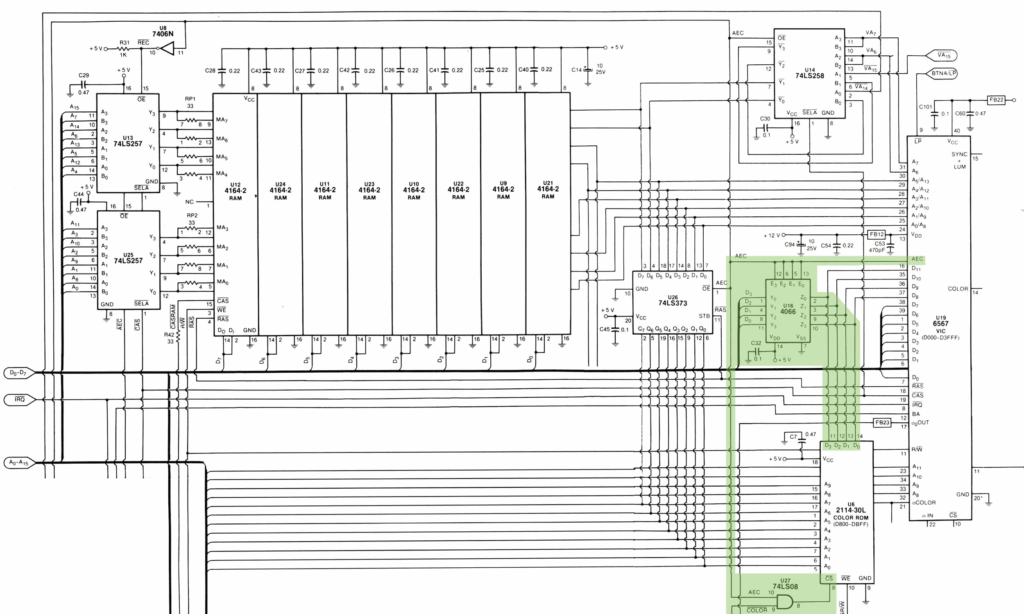
There are quite a number of refreshing things about the Atari 2600 Technical Wiki. There’s its subtitle, “Woodgrain Wizardry,” which is excellent. Its dedication to a 47-year-old game console. There’s it being a wiki that isn’t being hosted on damnable ubiquitous Fandom. Its direct writing style, which gets right to the point of each page. It’s also not a Youtube video, which is sort of okay if you have a Premium account or a working adblocker, but a hellscape if you don’t. Its the kind of page Google Search de-prioritizes if you’re not doing a web-only search, and even if you do that, sometimes gets skipped over.

It is true, this one’s for hardcore geeks and programmers only. I love reading about stuff like how to do large 48-pixel graphic displays, useful for score readouts or title screens, even if I probably won’t ever use that information myself. Or on Bank Switching, which reveals that, since there’s nothing in the system’s tiny cartridges’ ROM space that indicates which bank switching scheme is being used, emulators scan through the executable image looking for signature bytes to determine when to map parts of it to the processor’s address space, and homebrew games try to give them appropriate hints so they’ll work smoothly.

There’s a page, Introduction to Processor Hardware, that gives us the surprising information that some EPROM chips, when used with the 2600, may act unpredictably when used in a dark room. That quality esoterica right there.

The Atari 2600 Technical Wiki

Doing Weird Things To A Sega 32X

The Youtuber: MattKC Bytes
What he did: Unexpected things to Sega’s aborted Genesis/Mega Drive add-on.
The address: here.
The length: about seven minutes.

The explanation: Did you ever play around with a 32X? Evidently not a lot of people did. It was straaaange. Unexpectedly powerful! A bit misjudged! Hosted a port of DOOM! Had a port of Virtua Racing that compares favorably with the Saturn version! Had that crazy hard-to-play Knuckles game that gave us Vector the Crocodile!

Have you ever hooked one up though? Its hardware is odd. It’s like a completely separate console to itself. The Mega Drive wasn’t made to support add-on processors and chips like that, so Sega used a clever solution: the 32X has its own video output, and also a video input. You plug the Genesis’ output into the 32X, and then the 32X into your TV. The 32X mixes the Genesis’ signal into its own, as if it were chromakeyed. Since the 32X cartridge supplies the program running on the Genesis as well as itself and they can talk to each other, the two processors and graphics chips should be able to sync perfectly, if awkwardly.

But: because the Genesis’ video signal emerges from that console through this external wire before reentering the 32X, it’s possible to do things to it while in transit. The Genesis supplies video timing information that the 32X relies on, so you can’t get a signal from the add-on without the Genesis’ AV plugged into it, but the Genesis does produce a viewable video signal that you can see on its own.

All the details are in the video, which has been embedded below for your convenience and amusement.

Youtube Series: Inside the Famicom

It’s only two episodes in, but this series from the Youtube channel What’s Ken Making is already really interesting, with episodes averaging at around 16 minutes each. The first part is titled “The Design of a Legend,” which doesn’t really grab me much, but the second is about the main processor, “The 6502 CPU,” which Ken admits near the start isn’t exactly accurate. The Famicom/NES’s processor isn’t precisely a MOS 6502; it’s a Ricoh 2A03 in NTSC territories, and a 2A07 in others. The 2A03 is licensed from MOS, but lacks the original’s Binary-Coded Decimal mode, and includes the Famicom/NES’s sound hardware on-die.

Episode 1 (15 minutes):

Episode 2 (17 minutes):

That removed BCD feature. Why? The video notes that the circuits are right there within the chip, but have been disabled by having five necessary traces severed. The video notes that the 6502’s BCD functionality was actually patented by MOS, and asks, was the feature disabled because of patent issues? Was Ricoh trying to avoid paying royalties?

How Speedrunners Get N64 Control Sticks

The Nintendo 64 broke ground for Nintendo in many ways, but arguably the worst part of that was the controller.

I’m not one of the people who complains about not understanding the controller or how to hold it. That part’s pretty easy to understand: you hold it one way, with the central prong in your left hand and the right handle in your right, for games that use the control stick like Super Mario 64; you hold it with one handle in each hand for games that instead use the Control Pad. It makes sense that Nintendo still wanted to feature the Pad prominently since it was one of the defining characteristics of the NES and SNES era.

The Control Pad is durable and easy to use, even if it does result in bruised thumbs when pressed with force, as can happen in challenging games. What’s not so durable is the N64’s signature control device: the Analog Stick. A special design that didn’t see much update after the Nintendo 64, because of the “white dust of death,” a mysterious fine powder that emerges from the inner workings of the stick after heavy use. Along with the powder always came degraded control performance: the stick would lose some of its tight feel, wobbling when shaken, and would no longer recognize the full extend of its range. All official N64 control sticks would succumb to the dreaded dust with time.

During the console’s life the source of the powder wasn’t common knowledge. It turns out it’s the result of the control stick grinding against its housing and actually rubbing itself in a fine dust. The looseness came from the powder getting into the tight confines of the stick’s mechanism, and from the pivot chamber getting looser as it was ground away by the joystick.

Some games were notorious for decreasing a controller’s working life. The Mario Party series was infamous for demanding rapid spins of the control stick, that could produce the dreaded dust and wobble after surprisingly few games. But with use, it seemed that all the official joysticks would succumb to it eventually. Third-party sticks, such as the then-ubiquitious MadCatz sticks, didn’t suffer from the problem, but their control sticks weren’t as sensitive, and required a smidge more force to push. For demanding play, the official sticks are a must.

This has resulted in a big problem. Since all the Nintendo-made N64 sticks degrade eventually with use, and Nintendo isn’t making them any more, speedrunners playing on original hardware have few options for playing games the way they were intended by their designers. Some jealously hoard pristine sticks, which have become expensive, while others work to make replacements.

Retromeister on Youtube has made a 24-minute video explaining the problem, and the lengths to which runners have resorted to keep themselves playing. And this, following, is that very thing: