All the OldWeb is NewWeb again. This is just to inform you of warppoint.games, a new directory and webring devoted to game-related content! Set Side B is listed there, and there’s a new link to it in our own sidebar.
There’s already a good number of links to explore, so take a look when you have a moment!
Now here’s something fascinating I had not heard of before Nicole Express recently wrote about it. Because of a law in Japan it was (maybe still is?) illegal to sell an arcade cabinet without a game in it.
When the market for replacement cabinets opened up, targets for upgrade kits without gutting an old machine to host them, they still had to have some game in them, even if everyone knew its PCB would be just be taken out and thrown away. It was also a way to assure a game center owner that the cabinet worked as advertised, as it could immediately be plugged and tested.
But games cost money to develop and need parts to implement, so these games have to be really simple. So there arose a micro-genre of games, usually a simplified remix of something from the cabinet manufacturer’s back catalog, using ancient processors, minuscule ROM and RAM, and the simplest means of driving the video signal possible, to fulfill this tiny and strange market need.
Sega’s Dottori-kun (image from linked site).
Nicole so far covers three such games: Sega’s Dottori-kun is a remake of their classic arcade game Head-On (remade before by Atari as Dodge ’em), a simple dot-eater where the player’s surrogate is a car that can only drive around a track one way. Taito’s Mini Vaders is a series of Space Invaders challenge boards, but with no enemy shots or sound. And most recently Konami’s Target Panic is a kind of fast reaction target shooting game, but using a joystick instead of a light gun.
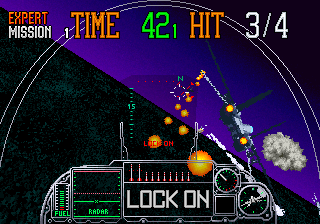
Dottori-kun, a silent blue-and-white remake of a 1979 arcade game, was, via Sega’s Aero City cabinet line, a game they were publishing the year that also saw the release of their Super Scaler extravaganza G-LOC.
G-LOC, Dottori-kun’s sibling. (Image from Mobygames)
Nicole goes into detail about each of these games, possibly the most attention any of them has gotten outside of their creation, including their internals. She really knows her stuff, and dives into the implementation of each game. All three run on Z80s or variants. Only one of the three games, Mini Vaders, accepts coins. All three articles make for fascinating reading, at least to my fevered mind, so please click through
It’s been going around the gaming bigsites (PC Gamer, Time Extension, Kotaku, Eurogamer and others) that due to a quirk of US copyright law Richard Garriott, who begin the Ultima series in June 1981, may finally be getting back the rights to his now-ancient series from the corporate behemoth, Electronic Arts, that has long owned them.
The details of the story are that this only involves the copyrights, not the trademarks. But trademarks are different from copyrights, they must be continuously defended and expire if not utilized. Every so often Electronic Arts attempts to do something new with the Ultima name, but none of them usually turn out that successful. The sole remaining example of classic Ultima is the venerable MMORPG Ultima Online, older than World of Warcraft, even older than Everquest. It’s possible that EA could use its unbelievable continued existence as a pretext to keep hold of the Ultima trademark, but UO is incredibly ancient itself nowadays and doesn’t have the large userbase it once did.
I have no love for the monstrosity Electronic Arts has become, the memory of their enlightened early years under Trip Hawkins fading after decades of stagnating sports lines chained to big leagues licenses, and piles of brown and gray military shooters. They sit on countless classic computing properties, doing nothing with them while people who fondly remember them age and die off. Yet I choose to believe this isn’t out of spite, more that they can’t be assed to do anything with properties that aren’t gigantic sellers.
Ultima is one of the few cases where a piece of their gigantic lucite block of IP shows a crack that could be broken away. Richard Garriott has maintained his wealth from the time of Ultima’s success, and may have the resources to fund a revival. Whether it would be successful… I can’t say. Garriott has tried making multiple games since leaving behind Ultima with varying degrees of quality. His Tabula Rasa from NCSoft, from nearly 20 years ago, didn’t do well; I’m not apt to hold that against Garriott though, considering how badly they treated City of Heroes.
Every so often Richard Garriott comes up with some new concept, but truthfully it’s been a while since he’s made waves. I personally sat at a talk he gave at DragonCon a few years ago where confidently held forth on the direction that he saw gaming going, but then failed to go. I’ve tried Shroud of the Avatar: Forsaken Virtues recently, he was involved with it but has long since left it. I bounced off. I’d like to give him the benefit of the doubt, but Garriott’s most recent project involved NFTs, which seems like a huge danger sign.
My personal opinion is that Richard Garriott should immediately approach Digital Eclipse, developers of the terrific remake of Wizardry: Proving Grounds of the Mad Overlord, and together start making something along those lines. Richard, if you’re somehow reading this, please consider it! They do great work. Maybe something involving Ultima III, IV or VII? Any of those would be amazing and could open up this long-neglected series for a new generation of players.
Anyone else out there have personal experience with how amazing this game was?
I’ve heard that Garriott is going to be at DragonCon again this year. I plan on reporting on it on-site. Despite what you might think from what I wrote two paragraphs above I’m still rooting for him. Ultima is the most shamefully neglected classic RPG franchise out there right now, and I’m excited to think that it might make a comeback, no matter how unlikely that might seem right now. I didn’t think Wizardry could make a comeback either! Let’s all clutch our ankhs tightly and hope.
MUDs, and their sibling games MUCKs and MOOs, now almost forgotten except among a rapidly-aging userbase, used to be the biggest gaming draw on the internet. When MMORPGs became big, it was largely by using the lessons of MUDs and applying them to a 3D graphical world with action gameplay. Everquest (admit it, you haven’t heard that name for a while) and World of Warcraft would never have become big if it hadn’t been able to stand on the shoulder of MUDs. And now, with WoW’s memory receding in the minds of many users, I think it’s well time to go back and find out what the originals were all about.
That Antiquarian article is pretty amazing. In the original MUD, if you got enough experience points you could become a wizard, basically a moderator yourself. If you killed another player they had to start over from scratch, and you got 1/24th of their experience points. Other ways to gain points was to find treasure and drop it into the swamp. Once treasure was swamped it was gone until the next server reset, which only happened when nearly all the treasure was so disposed. While you could find and use weapons, there was a limited number of most of those in the game so most players had to be satisfied with basic stick weapons.
But despite these limitations, players managed. Wizards could crash the game easily (there was a command specifically for doing so!), so mostly they didn’t. Customs were decided on; it was improper to kill a player more than two levels below yours. The game continued, and players largely came up with their own solutions to social problems.
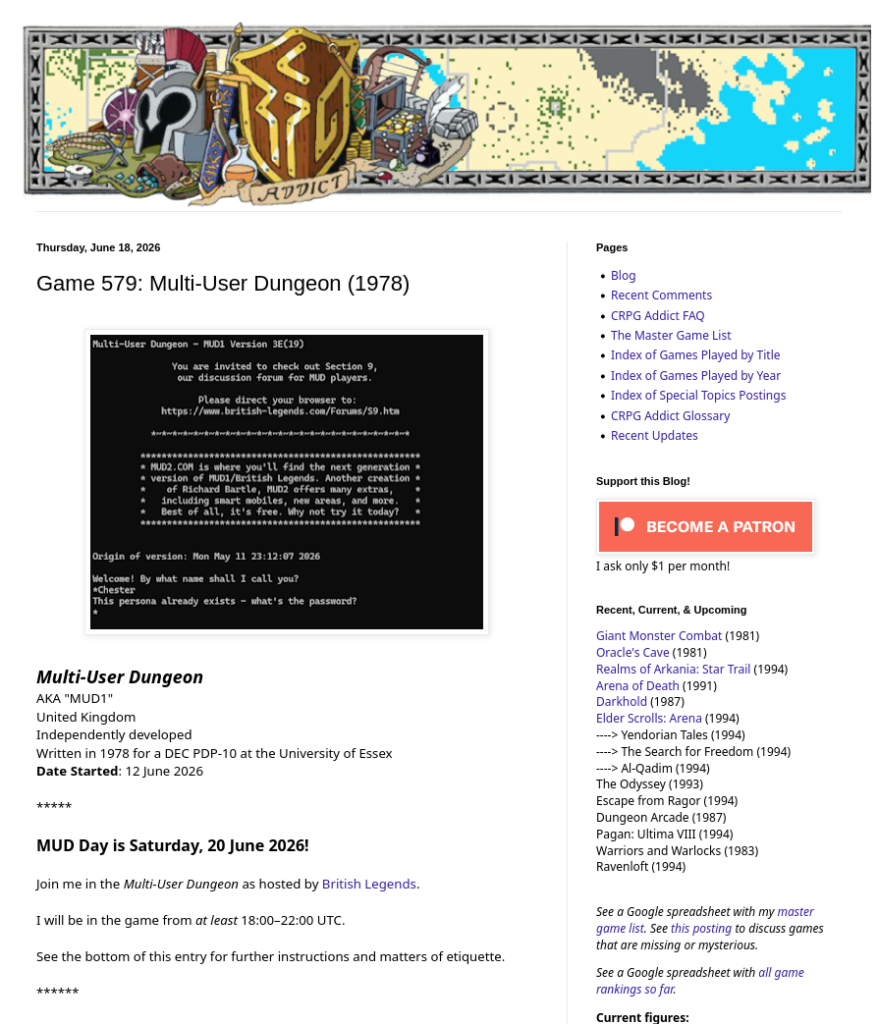
The CRPG Addict explains that the original MUD is still in operation at british-legends.com, and that you can even join him there to play today! Times are in his post.
I was just looking through Hunter S’s video on the holiday glitches of Gamecube Animal Crossing (11 minutes). By “holiday,” it means the winter holiday, and the various weird things that are possible during this season, like using snowballs to get pushed out of bounds into the ocean, getting a dummy item due to a data error when playing games with villages camping in igloos, and others.
I think the most interesting thing however has to do with GC’s Animal Crossing limits. Although the system clock extends out to 2099, the calendar of the game itself only supports dates up to 2030! When the date rolls on at midnight, December 31st 2030, the game will advance to 2031, apparently as normal, but on saving and reloading the year will become 2030 again.
The video was made two years ago in 2024. It’s now 2026, so you only have about four-and-a-half years to play Gamecube Animal Crossing in the intended way. All the AC games have date limits like this. The Switch version, New Horizons, is said to be able to even open save files from 2061 and later, so that’s one edge the Gamecube version has over it.
If you’ve been reading us for a while, you’ll know that I have an inordinate fondness for the early days of this here World Wide Web. I have become disenchanted with social media, the infinite scroll, and not just Web 3.0, but even Web 2.0. React.js and other frameworks. Gimmie that good old HTML religion. You can have some CSS if you promise not to go crazy with it.
You might wonder how many of these websites can be left. It was just in April that the long-decaying webhosts Tripod and Angelfire finally and suddenly went dark. How many of these old pages remain? Well, going by the link count at Early Web Links, at least 12,000 of them.
There’s actually many more than that out there, but they’ve been neglected, abandoned by the money web. Good luck finding sites like these in Google, they’re much more apt to send you to Reddit or Youtube. All the big social media sites actively downrank sites with the temerity to include links in them, for if you follow them, you’ll be leaving the lucrative walled gardens of Facebook, or the fascist-supporting castle walls of “X the everything app.” The rise of more healthy social media like Mastodon and Bluesky is a counter to that, but they’re still dwarfed in size by the likes of Instagram and Threads.
If you want to find interesting, independent Web 1.0 sites like these, your best bet is a directory like Early Web Links. Despite the name not all of these sites are old ones, many are quite new. They’re “early web” links because the sites are done in the style of the oldweb, and presented from a link directory not dissimilar to the fertile environment that, decades ago, was the mulch that supported the roots of Yahoo and its improbably-lasting multimedia empire.
Of course, that was decades ago. If you’re looking to make a fortune now then these sites aren’t going to provide it to you. But what they can give you is honest, earnest enjoyment, not tied to an algorithm or funding billionaires. Go have a look! We’ll be here when you’re done.
We collect literally hundreds of links in compiling stuff to you, far more to give everything its own post. Here’s a scattershot collection of some of it, we hope that one or two of them might strike your discriminating fancy.
As often happens, I find out about something cool right as it ending, and so it is with Good Internet Magazine. However its archives are still up at the moment! There’s cool things to find there like Build The Web You Want To See. I found out about it from this post on brennan.day, which is announcing an upcoming site called Long Horizon.
Along those lines, for three years now Robert Birming has been organizing Junited on his blog, which is just an excuse for bloggers to link to each other. I think people should link things all the time, for any excuse, at the drop of the hat (that’s largely what I do over on Metafilter), but if some people need an excuse to do it for a month I can get behind it!
Returning to the subject of cool things ending, it didn’t get mentioned much in my online circles, but both Tripod and Angelfire, two of the biggest remaining free/low cost webhosts from the early days of the web, have called it quits. Parent company Lycos continues to soldier on, free of one more of those pesky legacy services they couldn’t be bothered to preserve. Bah.
On Mashable, Chris Taylor has a piece about the backlash against generative AI. I’m glad it’s being noticed how much people detest it! Let the anger flow through you! It’ll give you cool lightning powers!
I’ve talked here before about my efforts to preserve and make available the archives of the long-lived disk magazine Loadstar. Please forgive me for linking to that once again, but sales of it help me obtain food: Loadstar Compleat. If you want to see more past posts on Loadstar, you can check the helpful Loadstar tag.
Loadstar and its side project Loadstar 128 were made for the Commodore 64 and 128 home microcomputers. They were disk magazines, a niche of publisher Softdisk, distributed by mail, and for a while even on newsstands. Even after it became untenable to keep distributing by retail Loadstar managed to retain enough subscribers to keep going for a while longer.
Loadstar lasted 22 years, from 1985 to 2007, an amazing run lasting well into the Internet Age. It hasn’t been 22 years since 2007 yet. In that time they published more than 6,700 items. Sure, it had its ups and downs, and towards its end its last editor, Rev. Dave Moorman, had to struggle to find things to fill its four disk sides with. Its last year only saw two issues, but Dave was determined to keep it going, aiming for 256, the number of possible values in a byte. Sadly a tornado hit his home and destroyed his issue-making setup. (We talk sometimes about reviving Loadstar and making the last six or seven issues ourselves to fulfill Dave’s ambition. We have most of the tools, and it’s much easier to find new Commodore software now than in 2007.)
Loadstar wasn’t Softdisk’s only product. I can legally distribute Loadstar because of a special carve-out for it. Loadstar is still owned by its longest-running editor, Fender Tucker, who used to sell physical CDs of the issues, with an old version of VICE on it to run them in emulation. I have one of those CDs myself, and it serves as the base of the version of Loadstar Compleat we sell with Fender’s permission.
The company that originally published Loadstar was called Softdisk Publishing. Founded in 1981 by Jim Mangham, it was a similar product to Loadstar but for computers in the Apple II line. It was also successful, lasting (I believe) for 166 issues (Loadstar went for 249), and given the popularity of Apple IIs could probably have lasted a bit longer, but for a lamentable fact: Apple IIs were refreshed several times during the series’ life, as Apple II+s, Apple IIes. Apple IIcs and then Apple IIGSes. Early issues don’t even run on Apple IIs after the + line; later machines, especially the GS, have much greater capabilities than the original, so a stock II owner would have to upgrade to get the most use out of the final issues. Unlike Commodore 64s which cost $200 for most of their life, Apple IIs were always pricey, and eventually an owner would have to decide whether to invest more money in a line of computers even its manufacturer didn’t seem too interested in anymore, or switch to one of the teeming IBM PCs types that were everywhere by then.
I’d like to tell you more about Softdisk the magazine, but I’ve never used it! Just now, today, I’ve finally been able to obtain a mostly complete set of issues from the Internet Archive, in Softdisk Supreme. Doing so was an adventure involving an ISO using the Mac HFS filesystem (so standard ISO-manipulation tools proclaim the disk image to be corrupt), the website Infinite Mac, and having to dodge several annoying quirks of both Infinite Mac and Classic Mac OS itself.
Softdisk Supreme was the product of a company called Syndicomm. Distributed on CD much as Loadstar Compleat was, Syndicomm was owned by Eric Shepherd, who transferred it to Tony Diaz in 2011. Diaz passed away in 2021 (source), leaving ownership of Softdisk’s properties uncertain.
Or are they? There is a note in a PDF supplied with Softdisk Supreme that tells us that Syndicomm didn’t own Softdisk the Magazine, but just licensed it from the company:
According to Wikipedia, “Softdisk, LLC” is another name for the company of Softdisk Publishing, probably adopted after they stopped making disk magazines and settled into their late life as an ISP.
Softdisk made more magazines than just Softdisk and Loadstar. For the PC they made Big Blue Disk and Gamer’s Edge. I’ve found a mention online that parts of Softdisk’s legacy were sold in pieces to other companies. My Abandonware doesn’t distribute several notable games from BBD’s issues that were made by the id Software people, like Catacomb 3D, pointing people (but not directly) to GOG. Here is a direct link. It’s $6 for six games, and in the style of GOG retro releases they’re packaged with an emulator capable of playing them out of the box.
Catacomb 3D is listed as made by “id Software, Softdisk Publishing” and “Catacomb Games.” It’s the only product by Catacomb Games on GOG. They have a website. They’ve opened the source code to the whole series and uploaded it to Github. While their website doesn’t list a point of contact, their Github account page has an email address, which I sent a polite request to just a few minutes ago. I hope they can clear up the question of ownership, and if they can, that it’ll illuminate a path towards offering a package similar to Loadstar Compleat for Softdisk’s other products.
I believe that all software has value, but Softdisk’s output easily exceeds that low bar. The Catacomb games don’t need my pitiful efforts at preservation, but Softdisk published lots of other stuff that’s in serious danger of being lost forever. In addition to the work of their in-house programmers they accepted submissions, and bought software from a wide range of programmers. Many of those coders are aging, or are no longer with us. Attention must be paid! They cared about their work, and so must we. Wish me luck.
Over on the site vale.rocks Declan Chidlow has written up a complete rundown of every console web browser, and it’s certain to spark memories in many of you. Including web browsers in consoles used to be a useful way for a company to distinguish their system from others, but as they admit at the end of the article, now the web is with us constantly, on phones and tablets, and people are more likely to turn to game consoles to escape from it. I’m sad about that, there’s still a lot to like about the World Wide Web, it’s mostly the social media elements of it that suck.
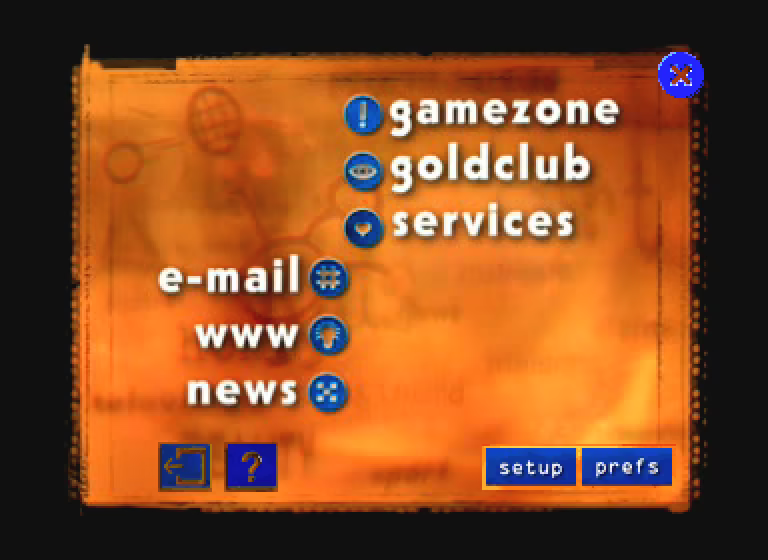
Probably the first console web browser, on the Phillips CD-i. (image from the site)
The systems listed are the CD-i, the Sega Saturn, the Apple Bandai Pippin (wow really?), the Nintendo 64 (only in Japan with the 64DD add-on), the Game Boy Color (through the Mobile Trainer cartridge), Sega Dreamcast (I remember it well), the Wonderswan, Playstations 2-4, Portable and Vita, Nintendo DSes original, I, 3 and New 3, Xboxes 360, One, S and X, the Wii and Wii U (the Wii U had quite a cool browser, as the article explains), and technically speaking the Steam Deck (which can run lots of other software too). But please click through and read all about them!
Proclaiming something for sure in the realm of vidyagaems is just asking to be challenged and possibly humbled. Yet it seems likely that the first true video RPG, as pointed out by -Eclipse14- in this video (10½ minutes), is the Atari 2600/Supercharger game Dragonstomper.
I have played Dragonstomper, in fact I wrote about it in an ebook on 2600 games here, and it’s quite an interesting game. Defining an RPG these days is rife with complication, but then it a bit more obvious: statistics, character building, equipment, exploration and turn-based combat. Dragonstomper has all of these things and more.
The Supercharger was a peripheral that allowed games to be loaded off of cassette tape. The unit itself housed an amount of RAM that held the games that the system would run. The Atari 2600 didn’t have write lines leading out to the cartridge, so the Supercharger had to load the code itself, which looked like normal inflexible ROM to the Atari. But the Supercharger could handle multiload games, making it much easier to make large games for the console. Dragonstomper was stored on the tape in three segments, corresponding to three stages of the quest.
The first section, and the most open-ended, involved exploring the kingdom, fighting monsters, finding items and trying to build your character’s power. A complication to this is that five magic items, a Charm, a Cross, a Potion, a Ring, a Staff, have randomized functions that change every time you begin a game. (There is no saving; the Atari has no way of writing to the tape.)
To get to stage two, you must get past the guard to town, either by showing him an ID, by bribing him, or by defeating him in combat. (They have more health than the dragon!) Town is kind of a break area where you shop for items to help you in the final part of the quest: the tunnel to and fight against a dragon waiting for you in its cave.
There’s all kinds of interesting things you can do, that helps give the game a lot of replayability. For example, you can hire fighters in town to accompany you against the dragon. There are traps around but also items that can reveal their locations to you. You can fight the dragon in melee, or by firing a longbow at it, or you can even avoid fighting it all together by figuring out how to get the gem its guarding without fighting it. There is a GameFAQs guide to it (contributed as late as 2023) that gives a good rundown of how to play and win.
Oh joy, it’s another Nintendo Direct, full of games I don’t have much interest in.
In the past I’ve done brief takes on every game in a Direct, but I feel like this time I’d be reduced to either saying the same thing about many of them that I’ve said before, or else be forced to resort to the same kinds of loathsome cliches most game enthusiast sites use. No thanks.
Oh look! Yet another grandiose and pretentious anime-themed combo-based melee combat RPG, how original. Is there an omininously Latinish-named evil force? Are we destroying God again? Are there Disney characters in this one?
Most game players, it’s true, are either kids or recently-kids, and I remind you that I haven’t been either of those for a long time. Think of me what you want for saying this, but these base and juvenile depictions of coolness are things I outgrew long ago. But I suspect at least some of you think that way too, so here then are the few games that I’m genuinely interested in from the recent Direct.
Rhythm Heaven Groove
This is the big one, the game from the show I’m most likely to actually get when it’s released. All the Rhythm Heaven games are big gooey piles of joy and this’ll be the first new entry in an age. (Example from a prior game: Packing Pests.) The footage we saw yesterday only confirms my anticipation. A day one purchase for me.
Big Walk (cross platform) *
The first game from House House since Untitled Goose Game looks very interesting, basically just an excuse to wander around a big island wilderness with friends. Big Walk purposely eschews most of the concessions most games make when exploring large spaces, like fast travel, and the ones made when communicating with other players in large spaces, like being able to talk to people wherever they are. It doesn’t just this for realism’s sake though, many of its puzzles rely on overcoming communication difficulty. It’s wildly experimental, and my only real qualm with it is most of my friends aren’t the kind to explore such a game with me. For those who have them though, this is something to watch for.
Deltarune Chapter 5
I loved Undertale and Deltarune Chapter 1, but then fell away from playing the series myself. But I love watching other people play through them, so soon there’ll be another quirky and fun, yet entirely vicarious experience for me to watch.
Nintendo Switch Sports Resort
This is essentially the Switch version of Wii Sports Resort, the followup to the Wii pack-in Wii Sports released way back in 2006. I still have many fond memories of playing Wii Sports with friends back then, a perfect pack-in game if there ever was one, but each successive game was more complex, and that much harder to get friends interested in. The simplicity, perhaps even more than cheapness, of Wii Sports was what made it accessible to so many people. I’m sure when we reach the inevitable age of nursing home Wii Sports parties that the appeal of its simplicity will become even more important.
Final Fantasy Resonance
Not only is it the first Final Fantasy game to get the HD2D treatment, but the first (somewhat) new one to get it too. The brief glimpses we got of it show us a game that seems to take after the old-school 16-bit era battle systems that recent entries, and I find that more appealing than anything else about it. It’s not that I’m nostalgic for the way it was done, but there the quality of the experimentation seemed greater, there was less change for its own sake, and there were still attempts, even if just nominal ones, at simulating adventure above just throwing systems at the wall. But I’m old and grumpy about these things. Just give me five minutes and I’ll probably fall asleep in my rocking chair. Oof, here I go now… Zzzzzz…
It’s been a small eon, but ZoomZike is finally back with the latest in his epic series of video deep dives, Identifying Luck in Mario Party, with a 2½ hour entry on Mario Party 10, being for the Wii U probably one of the least played titles in the series.
We’ve linked to these several times before, and I claim directly to you that they’re about as good as you get when it comes to investigating game internals. PannenKoek goes more into specifics and implications maybe, but ZoomZike has much more ground to cover. He’s now done twelve Mario Party titles, all in this playlist, and as they’ve continued they’ve gotten even more complete and detailed. The shortest of all of them is for MP1 at 1½ hours long; the longest, for MP7, is nearly 5½ hours!
Each video covers all of its game’s boards and events, all of its items and how they work, and all of its minigames. While “Identifying Luck” is the title and ostensible purpose, what we get is more like a complete guide to the internals of each game, includingly the many ways the games put their thumbs on the scales, often in favor of the last-place player.
They take a long time to chew through, oh yes, but if you want to know how the masters of video board gaming put their long-running series together, I don’t think you can find a better source.