By the “first LowSpec” processor it means the 6502. This video is a retrospective on its origins (27 minutes). With its manga-styled illustrations of key players interspersed by stock footage and the occasional meme, It’s not my favorite style for a YouTube doc (those would be the Dan Olson/Folding Ideas style), but it’s not a bad introduction?
This is kind of self-promotion, but it’s not just self-promotion as you can get tons of books by other people this way, including 10 volumes of Game Dev Stories from David Craddock, twelve books from Hardcore Gaming 101, four from Andrea Contato, and a couple from Dean Takahashi, as well as several other people, including, well, moi. It’s $35 for 66 books! I even threw in the two volumes of Someone Set Up Us The Rom as an extra, even though I don’t get anything out of it. I care that much about this bundle’s success.
No one gets rich from these bundles. The days when you could offer a ton of content at a steep discount and get thousands of purchases are long gone. But cash-strapped readers looking for a lot of info, if they can scrape up just $35, can get an amazing deal that will keep them occupied for a long time. I really think you’ll want to jump on this one, if you’re able.
I’ve been involved with these bundles for around a decade now. Some of the books I’ve contributed I’ve put up for sale on itch.io, but some I haven’t. The original version of We Love Mystery Dungeon is in it, which I’ve just taken down from itch.io due to its forthcoming expanded print edition through Limited Run, which is one of those sad but necessary things that has to be done when you sign a publishing contract, so this will probably be the last place you can buy the original version. By the way, I hope you’ll consider the new edition: it’s got added material on last year’s Shiren 6, a.k.a. The Mystery Dungeon of Serpentcoil Island, and a whole lot on the whole Pokemon Mystery Dungeon series.
I know I’ve made a few of these self-promotional posts lately, mostly over the Loadstar collection and related topics. I’ve always been anxious about spreading the word about my projects, paid or otherwise. I’ve seen so many people who seem shameless about tooting their respective horns, but it’s kind of necessary, I guess, to be seen through the crowd.
Well there it is. There’s 15 days left in the bundle, so you have a bit of time left to make your decision. Please have a look.
Nintendo’s announced that Mario Paint has been released on Switch Online, a movie that I modestly point out that I called some time ago, although I hoped they’d offer an export option that would let you make easy use of your creations, although one can use the Screenshot button to save your creation probably. It’s not the subject of today’s post, but their announcement’s pretty entertaining, so here it is (4 minutes):
The announcement mentions that one can use the restore states built into the emulator to save your work, which is at least better than the single save file available in the cartridge, or “saving” your work to VHS tape as the manual suggested. Another thing mentioned in the announcement is that, not only can people use the Switch 2’s Joycons as mice to replicate the function of the SNES Mouse that came with Mario Paint and required it, but in an uncharacteristic bit of generosity, it also supports USB mice when used on the original Switch models.
Mario Party is an interesting piece of gaming history. Without it, Homestar Runner probably would never have happened. Five years ago H*R posted bits of Mario Paint work to social media on Thursdays, which they compiled in this video (4 minutes, sadly not able to be embedded).
That’s two videos already and neither are the focus of this post, so what is? This digitization of an official Japanese Mario Paint tape was uploaded by Jeremy Parish, it’s 31 minutes, and shows off some frankly amazing creations that were made in the days where you had to actually use the mouse to make Mario Paint creations, without resorting to outside tools or memory manipulation. Surprisingly, it also bears the logo of APE Inc. Shigesato’s company that made Earthbound! Here here, it is this this:
One more note about the announcement video! It mentions that Mario Paint songs have been added to the Nintendo Music cellphone app. It also shows off “Title Theme 2,” which actually isn’t in the app, but is revealed to be Totaka’s Song! Maybe it’ll be added at a later date?
Displaced Gamers takes a lot of time to make their videos, but I always know their videos will be worth watching, and usually also worth posting about. Their newest video (36 minutes) is a typically deep dive into Metroid’s game engine, and why the game inexplicably drops frames. It’s only a first part so far, but they do an excellent job of breaking down Metroid’s game loop. As far as it goes to this point, a big part of the issue has to do with the main game loop being called to prepare game screens being scrolled into, which are kept in a big memory buffer (so big the game requires extra RAM on the cartridge to store it) and copied into the PPU’s VRAM when needed.
Here’s the video. If you enjoy this sort of thing, we’d probably get along very well in person!
The player can switch their switch themselves by pressing L and R, but only by pressing in, not out. Doing so both changes the state of all the switch blocks, and makes the switch itself much shorter. In play terms, this is equivalent of Super Mario shinking and becoming Regular Mario, and in fact getting hit by an enemy has the same effect, resulting in being switched prematurely, and all the blocks changing state too. To switch back, you collect a P Switch item, which is essentially a Super Mushroom, restoring both the player’s state and reswitching all the blocks.
We’ve posted before here of Diskmaster, a search engine that works on the contents of old CD-ROM file compilations. Diskmaster has gone away and come back at least once, maybe twice, but for the moment at least is up.
Discmaster Jam is a gamejam where participants are asked to make use of contents found on the CDs the Discmaster searches. The winners were judged by a number of Industry People, so you can expect a certain minimum level of quality from those. The list of submissions on itch.io’s page for the jam has a number of extra items on it, to peruse and examine.
Image from the site
One entry that stands out in my vision is “Where In The World Is That #@*% Owl!?” which was written for the somewhat-obscure ACT Apricot computer from the UK, which had monochrome, yet high-resolution, graphics
Image from the itch page for Where In The World Is That #@*% Owl!?
Of note: it turns out one of the disks that Discmaster searches is the original CD version of Loadstar Compleat! So that is another way you could satisfy a jonesing for C64 program action. If you see me report on a Loadstar program of interest, you could possibly find it there, in addition to the Loadstar Compleat compilation I’ve made for itch.io.
LordBBH has a most excellent website, of the style that those/old of us remember fondly, made out of plain hand-coded HTML scrolling down the finite-length page, with images and writing. Like |tsr’s classic NES site, and Gaming Hell’s current one. (A lot of the pages from our list of great gaming sites are like that!) Some days I fantasize about remaking Set Side B in that style, but we’re daily, I’m not the only one who posts here, and I don’t think Josh Bycer would appreciate it if I suddenly decreed that he write posts in raw HTML. Maybe some other time, or for some other site….
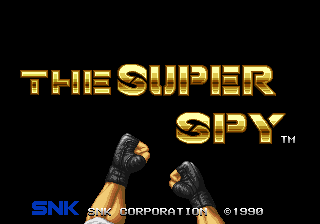
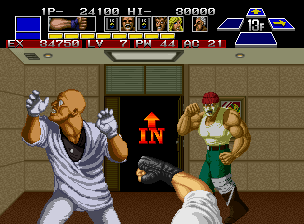
LordBBH is on Bluesky, but is taking a break from all social media right now, which proves his great wisdom and power. His site is still online, and hosts descriptions and information on several old arcade games, which as we all know are the best descriptions and information. One of them is on an SNK arcade game from the early days of the NeoGeo, The Super Spy.
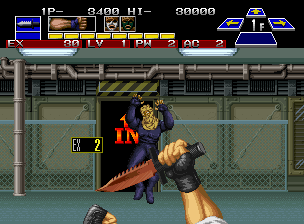
Images from LordBBH’s site, used for the purpose of providing context and to convince you to go to the site itself and read it!
The Super Sky is of a small field of three arcade games, NeoGeo first-person brawlers. It wasn’t too popular when released, but its two followups, Crossed Swords and Crossed Swords II, did considerably better. You can think of them as like Nintendo’s Punch-Out!! series, but less pattern-basis, more scaling, and fighting more opponents at once.
It’s an ambitious game for an arcade format, it has non-linear explorable buildings and an experience system.
In The Super Spy, you’re the titular uber-agent. You know karate, and can also box, and you take your lethal hands and feet (and a knife and a pistol too) against enemy terrorists in a series of three settings. It’s behind-the-back first-person yes, but you can’t rotate your perspective; you’re always facing north. An array of icons at the upper-right corner of the screen show which directions you can move in, and it’s the only indication if you can go south, or “down.” There’s at least one secret passage in the game that’s hidden that way.
You have an array of moves that would make Little Mac proud, including multiple kinds of punchse, but also kicks and slashes and shots. Each building you explore is swarming with enemies, fist guys, ninjas, mini-bosses, bosses, and exactly one woman, who you know SNK’s team of graphics creators were very normal about.
Dammit SNK. This isn’t even the most ridiculous thing about her art, which is that, in the Japanese version, her panties are randomized each time you reach her.
It’s easy to make fun of The Super Spy, but LoadBBH asks us to take it seriously, and while it’s quite unfair in places he makes a strong case that it’s worth your time. He’s written one of my favorite kinds of web pages about it, and I recommend you taking a look of you like weird arcade games. Go, go! And hover the mouse over images on the site to read entertaining alt text about each one!
I’ll admit, I’ve sat on this one for months. After posting about U Can Beat Video Games, I started to worry that this blog might get a bit repetitive if I kept posting about video game walkthrough series, and they take a long time to construct because there’s so many links, but it’s been a while since then, and VG101 has been around for years now.
Video Games 101, a side channel of a Let’s Play channel, covers much the same ground as U Can Beat Video Games. Some of the specific games are different. VG101 is a bit more about entertainment than the specifics of beating games and the strategy involved. Professor Brigands has three “TA” characters that assist him: Scary Gary (covering bosses), Blaze (a surfer who goes over the available items in each game) and Fluff the cat puppet, the most fun of the group, who explains game trivia and history.
I’m just putting it off still further at this point. Here is the intro video to the channel, followed by the list of every walkthrough VG101 has posted to date.
I’m helping out with Roguelike Celebration 2025, the now ten-year-running conference-like thing about all things roguelike, roguelite, and roguelike-adjacent. Yes, I’ve presented there three times so far, and figured it was time to give back!
While RC got its start as an in-person conference, when the pandemic hit they switched over to being entirely virtual, presented through video feed. All of their talks end up posted online, so anyone can see them for years after. But if you can attend during the conference you can participate in chat, ask questions of the speakers, and explore a very clever MUD-like chat interface!
I’ve tried to spread the word about Roguelike Celebration where I can, through social media and this very blog here. Every year they have several very interesting talks that, if you read Set Side B, I know you’d be interested in seeing. They’ve hosted Tarn Adams, co-creator of Dwarf Fortress, the creators of the original Rogue, and many other thoughtful speakers.
This year Roguelike Celebration takes place October 25-26. They sell tickets, but they also let people who are strapped for cash apply for a free ticket. (If you can pay for admission though, please do, as it takes money to run an event like this.)
And if you have a roguelike, or even vaguely-related project, please please please answer their Call For Proposals, to apply to present your work to their devoted audience of extremely thoughtful attendees! The CFP site is here, and their deadline has been extended to July 20th, so you have about three weeks to get in your proposal!
Give it a shot, it’s a great way to spread the word about roguelike work, or about a procedurally-generated game you’re interested in, or just something you think the world should know about.
By volume most game players, let’s be frank, are interested in the big AAA productions. But there are lots of people out there who are willing to give indies a chance, which roguelike games often are, and we have to stick together. Not only to talk with each other and build those connections, but to do it in public, non-corporate venues. Reddit largely is a sham these days, more interested in monetizing their userbase, and Discord isn’t web-searchable, and requires navigating a maze of requests that you upgrade to “Nitro.”
I do not lie: little volunteer-run organizations like Roguelike Celebration are a lot closer to the true spirit of the internet, and the World Wide Web, than those are. So please keep them in your thoughts, if you can buy a ticket, and if you have something to present, answer their CFP! You won’t regret any of those things.
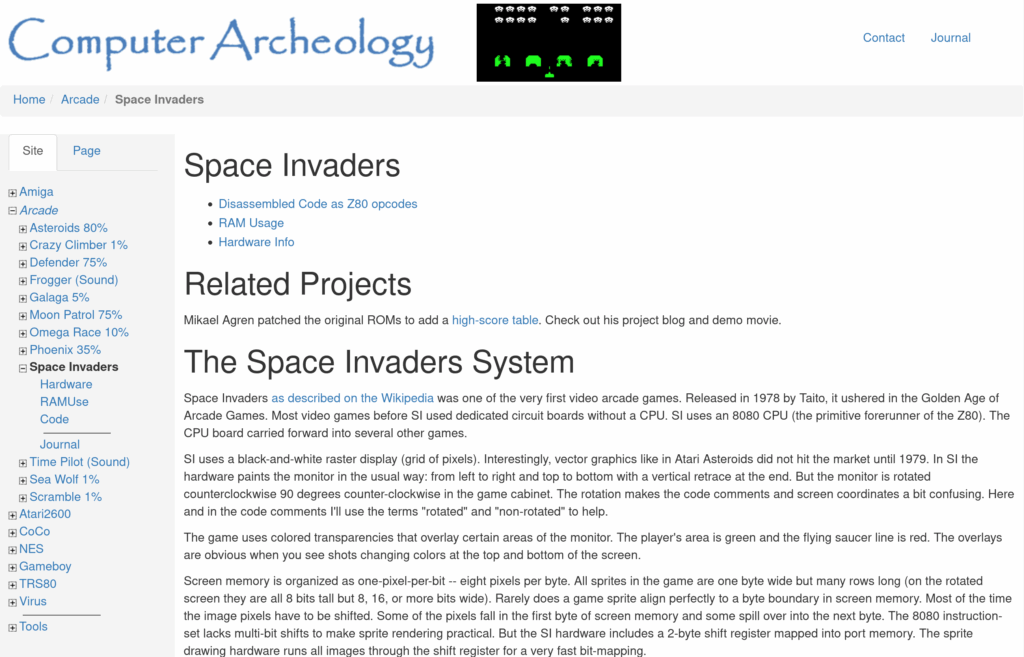
This one’s for the hardcore techies out there. Computer Archeology is a terrific site with information on the inner workings of several prominent games. One of their most complete and detailed is on the code and hardware of arcade Space Invaders, including a disassembly. While it is not, as the page says, “one of the first” arcade video games, not unless you count everything manufactured between 1972 and 1978 as unimportant, there’s a vast amount of good information there.
Some of the info revealed:
The game tracks five objects every frame. The player’s base, their shot, and three invader shots. The invaders don’t “count” as moving objects; the Mystery Ship temporarily replaces one of the shots, meaning, while it’s on-screen the aliens can only have two shots on-screen instead of three.
Only one of the shots is “aimed” to fall on or near the player. The others are just dropped wherever.
There is a bug where the player’s shot hitting the rightmost shield on the right edge of the screen can be misinterpreted as hitting the last invader on the very left edge.
The reason the invaders speed up as their numbers are diminished is because the game draws the new position of exactly one invader into the framebuffer per frame. Fewer invaders means each gets to move more often, until the last one gets to move every frame.
Is that hyperbolic? It probably is. But the heart wants what it wants, and what mine wants is CP/M for the MOS 6502 processor. Set Side B is a blog about computer entertainment, in all its many forms, and this qualifies in my mind, because it’s not like anyone’s going to be using it do real work. Right?
I found out about it through the (mostly) wonderful blog The Oasis BBS. It’s called CP/M 65, and it was made possible when CP/M’s source was opened in 2022. Wait, maybe I should explain what CP/M is. Sure, it has a Wikipedia page, but I like explaining it.
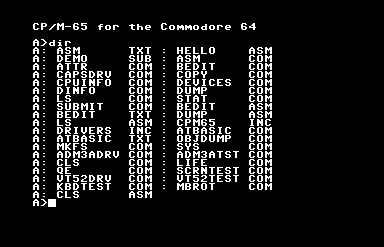
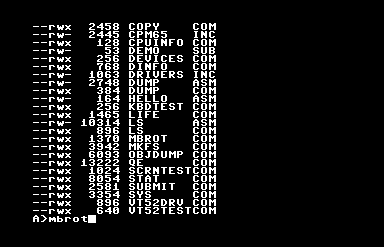
Output of the DIR command on the C64 with the system disk in the drive.
Gary Kildall created CP/M, “Control Program for Microcomputers,” for the Z80 microprocessor, and it became the first widely-used standard OS for home computing. Its importance and influence cannot possibly be overstated: PC-DOS (later known as MS-DOS) was created as a clone of CP/M for the 8086 processor, meaning, the reason .COM files are still technically considered executables, and why we still have drive letters in Windows 11, are both directly because of CP/M.
A case could be made that, if IBM hadn’t made the IBM PC out of standard parts, making possible the huge market for clone machines, it’d still be a CP/M world today, in some way. It was the first standard OS, one where it ran on machines made by more than one manufacturer. Many of the CP/M machines companies, the Kaypros and Osbournes, are gone now, but they had quite a large niche at one time.
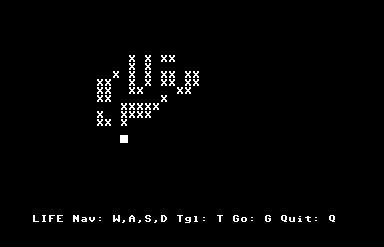
Conway’s Game of Life, for CP/M 65. Because it’s not really a computer until someone’s run Life on it.
Commodore released a CP/M cartridge for the Commdore 64, an amazingly ridiculous and rare package because the C64 used a 6502 processor. The cartridge worked only because it contained a Z80 processor inside itself, and put the 6502 in the system to sleep to do work. It ran much more slowly than other CP/M systems, and on top of that it still had to use Commodore’s 1541 disk drive, a fatal flaw, because it meant that while it could run CP/M software, it couldn’t read the disks that had them, because CP/M’s native disk format couldn’t be read by the 1541’s read heads. (The C128 had a built-in Z80, and the 1571 disk drive that was made for it could read CP/M disks natively, but by that time CP/M was already dying, pushed out by the PC standard and all those clones I mentioned.)
This thing I’m posting about, CP/M 65, has no relationship to that woeful product. It’s a port of CP/M to the 6502 processor. It can’t run Z80 CP/M software. But in all other senses, it is CP/M. What that means is that it has its own BIOS.
CP/M’s BIOS is what allowed its software to run machines made by different manufacturers. The BIOS acted as a translation layer between the hardware and the software. Programs wouldn’t interact with the hardware directly, but instead make calls through the BIOS whenever they needed to use some part of the hardware, like when it needed to access the disk or output characters to the screen. The result was that unless the software was written specifically to take advantage of a computer’s specialized hardware anything extra it had would go unused, but it also meant that a software developer could write one program and, so long as it restricted itself to interacting with the system through that BIOS, it could run on any CP/M machine that could read the disk.
DIR is the built-in CP/M command to report disk contents, but this release contains LS for those with that muscle memory.
CP/M 65 provides such a BIOS for all of its supported platforms, and as a result, while using it will give you a plane-jane, character-mode program, it’ll let you write a program that will run on any of them. Indeed, since this version of CP/M supports relocating executables, its programs can run on a much wider variety of hardware than original CP/M could. You can write a single program that can run on a Commodore 64, VIC-20, BBC Micro, Atari 8-bit, Apple II, KIM-1(!) and, if you can find the incredibly obscure keyboard and disk drive hardware for it or else emulate them, the Super Nintendo Entertainment System(!!).
But on a C64 it shines slightly more than the others, because it has integrated fastload routines, meaning that it gets around the C64’s greatest flaw, its horribly slow disk drive.
So this basically means now 6502s have their own cross-platform version of DOS, or something a lot like it. It has little software, but it does have an assembler, and a version of BASIC, and if you don’t mind writing it on a (pah!) modern computer, you can also write programs for it in other languages.
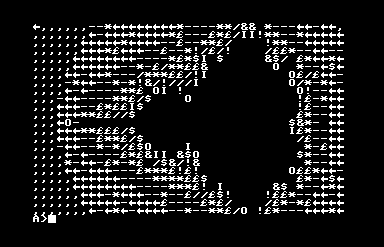
Behold the PETSCII Mandelbrot set!
If you want to try this wonderfully misbegotten thing, something like Frankenstein’s Monster wearing a ribbon, its GitHub is here, and you can find binary release disk images here. The one with the extension .d64 is the C64 version, and it loads right up in the Commodore computer emulator VICE, although I found out it’ll fail to boot unless you turn on “True Disk Emulation” for Drive 8. But it works! It comes with an assembler and BASIC, and a vi-like text editor, an implementation of Conway’s Life, and even a Mandelbrot set plotter. I kind of want to write software for it!
CORRECTION: Silly me, here I was assuming that CP/M 65 itself was a fairly recent thing, but as it turns out it’s been around for around 30 years!
CORRECTION FOR THE CORRECTION: Well the guy working in this very long Youtube playlist (maybe 31 hours?) created it in 2022, which isn’t 30 years ago. Ah well!
Loadstar was a disk magazine for the Commodore 64 that lasted for 22 years! I’ve been put in charge of organizing its archives. From time to time I’ll present something interesting from its thousands of published items.
Even though I’ve been spending a lot of time working on the Loadstar project, I’m trying not to overwhelm this blog with items related to this Commodore 64 disk magazine. So for the time being I’m restricting myself to weekly Loadstar posts at most. Maybe on Wednesday? How would “Loadstar Lendsday” be as a name? Hm, not great. I’ll work on it.
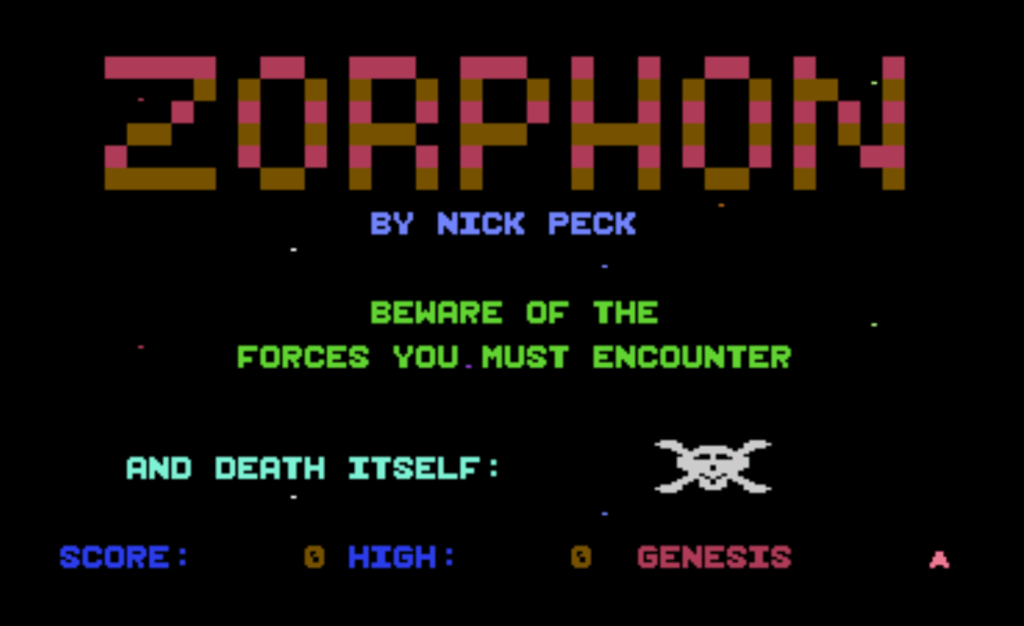
This week I bring you one of the most polished games Loadstar published, Zorphon by Nick Peck, from issue 39. Here’s some demonstration video I recorded and posted to Youtube (13 minutes):
While he did have a few miscellaneous other items published on its disks, Nick Peck only ever made two games for Loadstar. Both are great, technically impressive, programmed entirely in machine code, and challenging. (The other is Paragon, from Issue 50.)
Zorphon is a space shooter in the vein of Gorf, where each stage offers different gameplay. Zorphon has three stages that loop, although there is an extra one, “Genesis,” that plays before the first loop, that’s only encountered at the beginning of the game.
You have your standard-issue spaceship that’s locked to the bottom of the screen, that can only move left and right, like the ships in Space Invaders, Galaxian and Galaga. This poses special problems in the stage that plays like Centipede: if one of the purple space bugs makes it down to your ship’s level it’s done for, because it’s not possible then to shoot or dodge it at that point, so it’s essential to ensure that doesn’t happen.
I played this game long ago, when it had just appeared in the magazine’s September 1987 issue, and even though it’s a fairly simple game, its quality has stayed with me all these years. There are different ways to represent moving objects on the Commodore 64. The most obvious, and smoothest, way is using its hardware sprites, but there are only eight of them. You could use sprite multiplexing to reuse them as the raster beam traces down the screen, but that poses certain limitations on the graphics and gameplay.
Zorphon instead chooses a different means of representing enemies, it draws them on the character map. That means that the attacking aliens can only be displayed on character grid boundaries, which is a drawback, but it takes the cap off of the number of foes the C64’s VIC-II chip can display. You also get free collision detection: just check the register at memory location $D01E (53278) to see if the sprite that represents the player’s ship comes in contact with any background graphics data. This method means the collision detection is pixel perfect, the flag isn’t set if the sprite overlaps empty portions of a character cell. This isn’t always desirable, but the ship in Zorphon is large and chunky, so mis-detected collisions are unlikely.
Zorphon is, of course, in the archive of Loadstar Compleat that I maintain, although admittedly it is $15 there. You could also play it on the Internet Archive’s emulation of it. That is a “cracked” version though, which I find funny because Loadstar is for the most part not copy-protected. It will offer you unlimited lives, which is also funny since it’s a score attack game, and running out of lives is the only way for it to end. I think Loadstar #39 is also available there somewhere, but I can’t seem to find it easily.
If you decide to try it, by however means, here’s some tips.
All the stages of Zorphon are made more challenging by your ship’s limited firepower, having only one shot onscreen at a time. If you miss your shot you’ll have to wait until the other one exits the screen to try again, and that can take two or three whole seconds. Getting into a rhythm of shooting at monsters helps a lot, especially in the first stage, which is all about finding that rhythm.
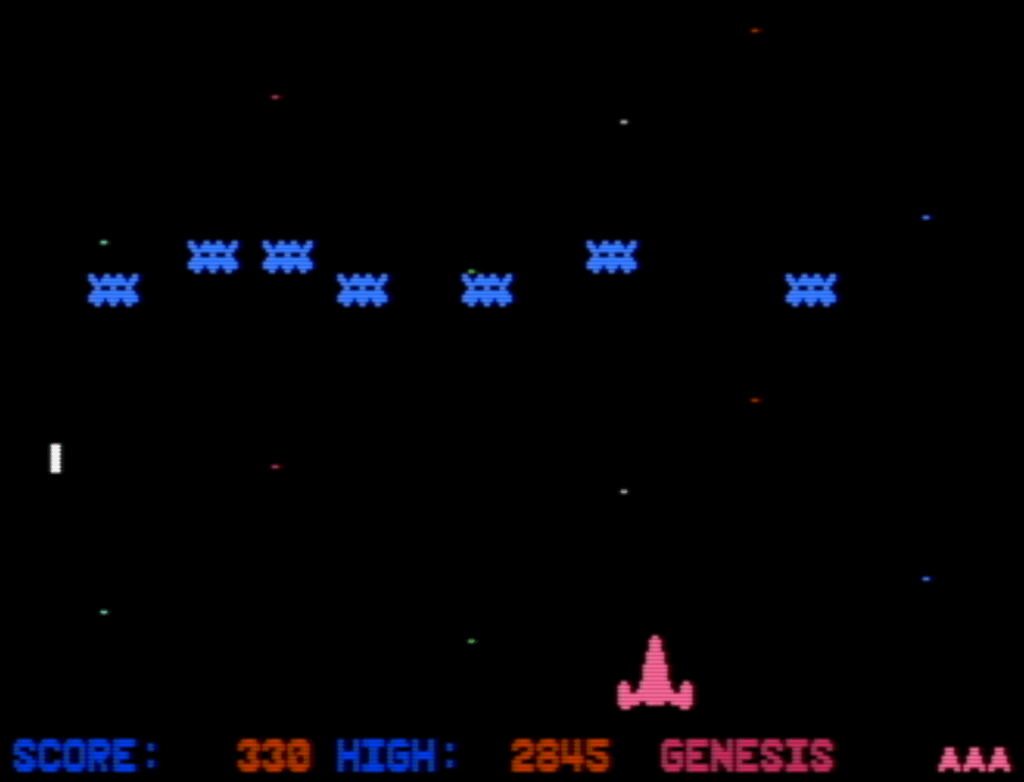
The bouncing enemies phase of the first level, Genesis. Until you figure out how to clear all of them, you’ll be stuck cycling between Genesis’ two phases.
The first stage, Genesis, has two phases. The first end when you shoot enough of the red TIE-Fighter enemies, but to finish the second you must destroy all of the blue bouncing aliens within a limited number of passes. If you don’t get all of them in time, they’ll completely replenish, and if you fail at it again you’ll be sent back to the TIE-fighter phase!
The blue bouncing enemies are really hard to hit. I find it’s best to hang out at the left side of the screen and shoot the ones there. Every time they pass by, they distribute themselves again, and there will always be an enemy on the left side unless there’s only one left (which will move to the center of the screen).
Since Genesis cycles until you pass it, one way to get a good score is to purposely repeat it, letting the blue enemies reset and then fighting the TIE-fighter phase again. Once you know the patterns Genesis isn’t very hard, and can be easily farmed for points. It’s not a very exciting way to play though.
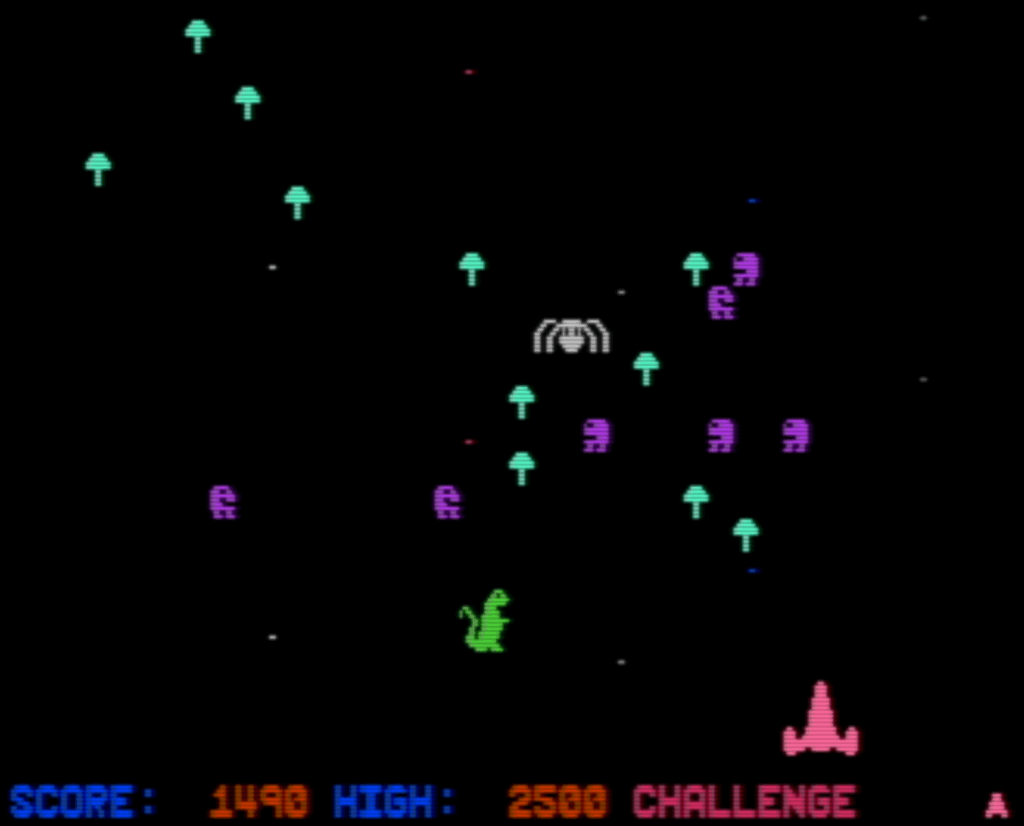
The Challenge stage, which is pretty hard!
The second stage, Challenge, will be the end for many players. It’s the Centipede-like stage, but your shots do nothing to the mushrooms! Many of the enemies wipe out mushrooms when they pass over them, which will help you out a lot.
To finish Challenge, you must wipe out two complete waves of centipede aliens, and a few pairs of segments that come in between them. After the second wave spawns, clear the stage of centipede segments and you’ll progress.
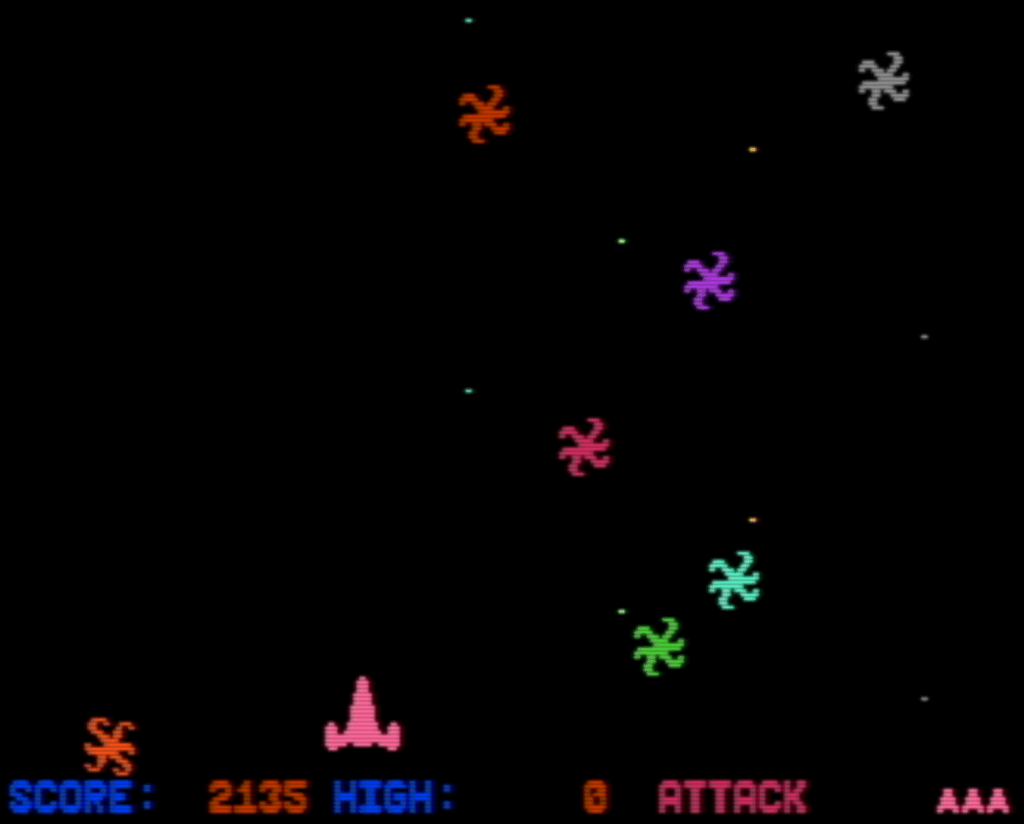
The third stage, Attack, is even harder!
The third stage, Attack, is really tough, and made harder by the fact that it’s so hard to get to it that you can’t practice it easily! Maybe getting better at it is a use for that infinite lives cheat on the Internet Archive version? Maybe! To finish it, I think you have to shoot enough of the bouncing asterisk enemies to pass it. Look out for the exploding bombs dropped by the flying saucers that come in from the side!
I don’t know remember if I’ve ever finished Attack and gotten to the last stage, but I seem to remember seeing a full loop at some point so I think I have. See if you can do it.