Romhack Thursday: The Ocarina of Time Practice Rom

On Romhack Thursdays, we bring you interesting finds from the world of game modifications.

Every GDQ, I find out about several things that I feel are worth telling all of you about. It happened once again this year, and that’s why I’m now pointing you to an invaluable speedrunning resource, the Ocarina of Time Practice Rom.

Of course, I don’t think you’ll want to speedrun it. But if you ever want to test something out in the game and don’t want to play through the whole of OoT to do it, it could be very useful. It’s distributed in the form of a patch program, available for Windows, Mac or Linux, and you’ll have to do a bit of command-line typing to run it. And you’ll have to supply the rom file yourself, of course, but that’s the case with all the offerings proffered by our sunglasses-wearing green friend up above. The makers offer support for the Virtual Console release of Ocarina of Time, but if you choose to play it in real hardware, you should know that the Practice Rom requires the 4 MB Expansion RAM upgrade for your N64. If you came by your Nintendo 64 unit second-hand, open the little hatch on the top of the console: if the little module in there has a red top, that’s the “Expansion Pak,” as Nintendo called it. If it has a black top, then you don’t have the expansion, just the “Jumper Pak” that came standard. If there’s just a hole in there, then you don’t have either, and your system won’t work!

Let’s assume that you get it all working, and both have a new copy of the Practice Rom and a way to run it. How does it work, and what does it do? Once it’s started up, it’ll take you to the game’s title screen like usual. Press Start and you’ll be at the File Select screen as usual. Enter a name and start the file, and you’ll even be taken to the intro cutscene.

But no one says you’ll have to wait through it. Hold the R button and press L, and a menu will appear:
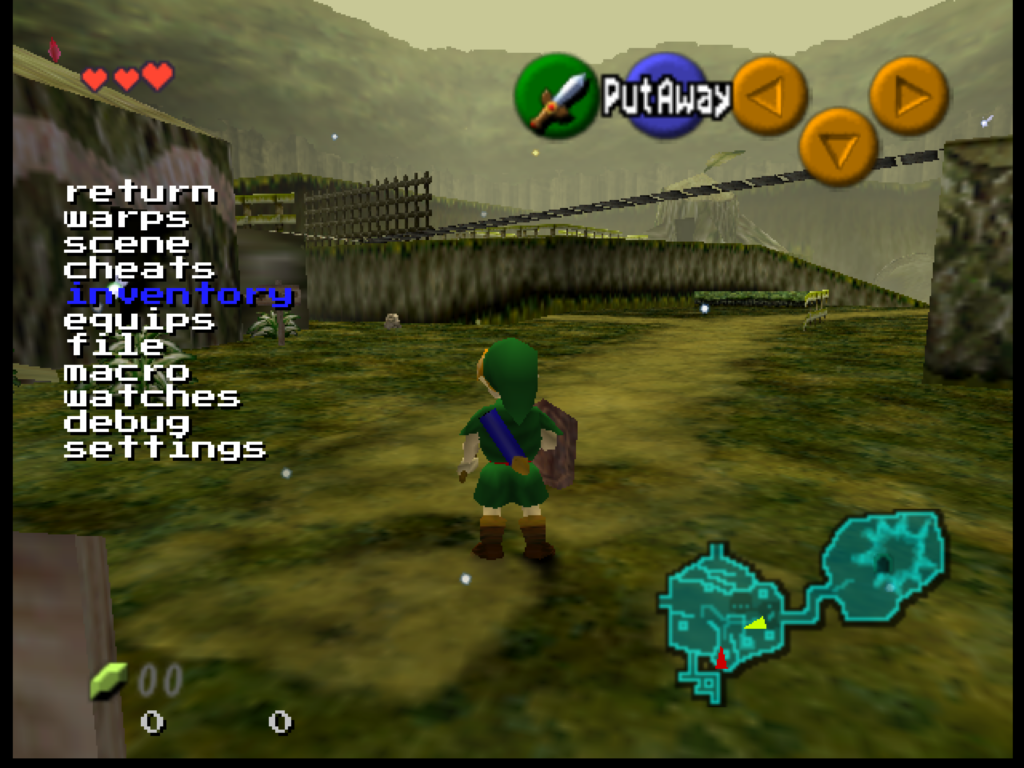
From here, you can use the Control Pad, or whatever your controller’s version of it is, to navigate this menu, while you continue to play the game, in real-time, with the Control Stick and other buttons. Pressing L selects things from the menu, and R goes back up a level.

From this menu you can warp to anywhere in the game, or give yourself any items! You can unlock the camera in 3D scenes and move it freely, or change the rendering to show collision surfaces. It even has its own save state manager. It’ll take some experimenting to find everything it can do.
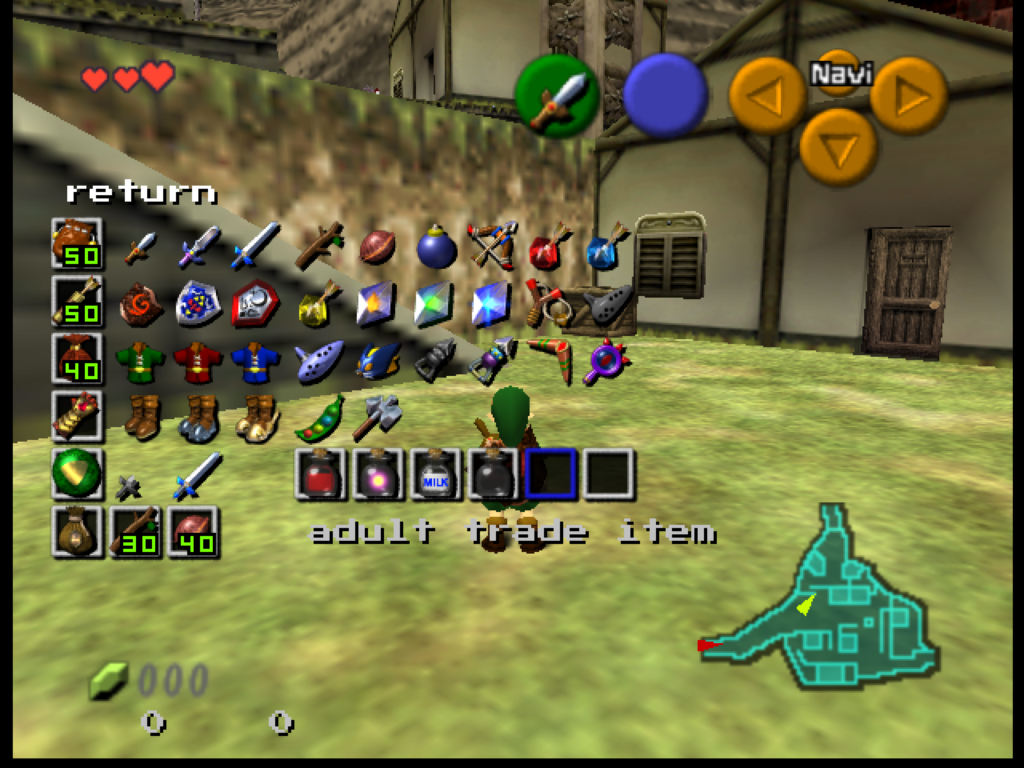
Is this useful? Well, maybe? Or maybe not. Are video games useful? I present it mostly as a curiosity. If you just want to play the game then mostly it gets in the way. It’s not a randomizer or remix, it’s just straight Ocarina, but with these extra things added. It has a full user’s manual on its website, and to make decent use of it you’ll probably need to spend some time with it. Check it out, if you’re of a mind.

OoT Practice Rom (practicerom.com)

Out Of Bounds Discoveries in Nintendo Games

I had a different post ready to go today, but it’s been delayed by a few days for unavoidable reasons, so let’s do another Nintendo obscurity video, this time for things that can be found “out of bounds.” There’s several interesting cases mentioned and shown off here in this video from Nintendo Unity. It’s 11 minutes long.

Some of cases shown:

  • In Punch-Out!! on the Wii, off-camera, Piston Hondo is reading a Sailor Moon manga in a between-round cutscene.
  • On the original Pikmin’s title menu, the name of the menu programmer is off-camera to the left.
  • There’s a cartoon drawing of a Goomba as a texture beneath Pinna Park in Super Mario Sunshine. This has been given the name “Kug,” and there’s more information on it on Supper Mario Broth and The Cutting Room Floor.
    • Noki Bay in Sunshine has a model of a book locked in an unreachable area. There’s more info on it on The Cutting Room Floor.
    • This one’s relatively well known: the trophy of Princess Daisy in Super Smash Bros. Melee has a texturing error that gives her a third eye, hidden beneath her hair on the back of her head. The trophy for Meta Ridley also has a hidden heart texture inside of it.
    • In Earthbound, if you can clip outside of the terrain in the upper-right corner of Onett, you can reach the ultimate upper-right corner of the whole map. (All of the areas in Earthbound are connected on a single huge map!) Interacting with the corner there can access a debug menu left in the game.
    • There’s a secret control room beneath the island in Donkey Kong 64.
    • Another well known glitch, the video mentions the glitch that lets Samus get inside the level terrain in Metroid by rolling into a ball and coming out of it repeatedly while a closed door surrounds her. This is the means by which people can get to the glitchy “secret worlds” mentioned in an early issue of the Nintendo Fun Club News.
    • At the end, the video reminds of the “Minus World” glitch in NES Super Mario Bros.

What Nintendo Games Do When You Delete Save Files

I know, lots of posts on this blog end up being about Nintendo in one way or other, but their corporate stance of toymakers, regardless of its truth, means they often do interesting things, and one category of those things is having special animations when you delete save files. But deleting save files is destructive, obviously, so many people never see them. Here’s a video compilation of some of them. Of particular note is the deletion process of Animal Crossing games (yes, them again!), and of all of those there’s the one for the original Gamecube version, which pretty much implies you’re killing your village’s inhabitants. A pretty heavy trip to lay on a kid! Here’s that video, from Nintendo Unity (9 minutes):

Sundry Sunday: Zelda’s Point of View

Sundry Sunday is our weekly feature of fun gaming culture finds and videos, from across the years and even decades.

Last week I put off Sundry Sunday to let you know AGDQ was about to begin! So this week I’ve brought multiple videos, all with the theme of looking at a Legend of Zelda game from the point of view of the usual-rescuee, Z-girl herself. No, not the one in the green suit! What are you saying?

In Wind Waker, Zelda gets to take a fairly active role in the story, until you (and she!) find out that she’s actually Zelda, and then gets stuck in hidden secret sunken Hyrule Castle for the second half of the game, boo! What did she do down there? K_Grovyle gives us a look (2 1/2 minutes):

Of course the newest Zelda game as of this writing actually has Zelda as the protagonist for the first time, allowing her the kind of malicious gaming shenanigans usually reserved to Link (and to confirm, the one in the green suit is Link, not Zelda, honest). jjjj4rd presents an animation of her usual hobbies while wandering the fields and wilderness (3 minutes):

And some more (3 minutes)!

What’s that you say? Zelda is actually the main character of all the other games? Zelda’s a boy you’re telling me? Why that’s not true, how could you even think that, I thought it was obvious, I–

(Video, from TheMasterOfDooM, length: 4 minutes)

Oh. Okay then, I stand corrected. Zelda’s the boy. Carry on.

Gamecube Animal Crossing’s e-Reader Cards

There’s been rather a lot of interesting Animal Crossing items to share lately, many of them from the Youtube account of Hunter R, who specializes in AC. He presents the video in today’s find, which is about an interesting relic from Nintendo’s Gamecube era: the e-Reader.

The e-Reader uses a variation of the technology used in QR codes. QR codes, surprisingly date back as far as 1994. Old-time internet layabouts like myself remember the CueCat, a special barcode scanner that was given out for free, under the assumption that they could make money off of them from advertisers using their tech to encode URLs to their sites in their print ads, then users could scan them with their CueCats to jump immediately to their sites. Yes, this was a business model that people once thought could work. Maybe it could have at one point: that’s the major use case for QR codes now.

The e-Reader was rather different. A Gameboy Advance peripheral released in Japan in 2001, and the US in 2002, it could scan tiny dot patterns printed on playing card size pieces of cardboard. Whereas QR codes are intended for small amounts of data like URLs, a single e-Reader card could hold 2,112 bytes of data. The hardware itself had a ROM built-in that contained an NES emulator, so one of the things that could be distributed, on small decks cards, were smaller NES games like the black box series. I had an e-Reader myself back then, and while it’s long since misplaced and probably lost for good, I still have an officially-released pack of cards somewhere with Balloon Fight on it, and also the weird e-Reader variant of Mario Party, which I think I’ve only ever had the chance to play once.

The e-Reader was one of Nintendo’s shorter-lived play experiments, and didn’t last long. But one of the most interesting releases for it was a large sequence of Animal Crossing cards. There were hundreds of these cards, and they were kind of like an early version of the current-day Animal Crossing amiibo cards. It’s amazing there were so many, because the hardware requirements were significant: you needed a Gamecube and GC Animal Crossing disk, of course, and the e-Reader, and a Gameboy Advance, and a GBA/GC link cable. And the cards themselves, of course.

The cards could be used to get all kinds of items in your Animal Crossing village, depending on the card. The amazing thing about the cards is that they seem like they’d be the kind of thing that would have been quickly cracked and turned into a way to obtain arbitrary objects, like the never-released Super Mario Bros. and Legend of Zelda NES items in Animal Crossing, but were in fact only broken fairly recently.

The 11-minute video linked here explains how they worked and how they were cracked, and also links to a GitHub repository with program that can be used to generate your own cards. But Hunter R. has been on this beat for a while, and has two other videos on the subject you can peruse if you wish, on generating custom villagers with cards (12 minutes), and generating Super Mario and Zelda NES items (18 minutes). The villager one is interesting because you can make arbitrary villagers with it, with appearances and names not among the ones included on the disk, although only using the Japanese version of the e-Reader. Even you don’t have the magic combination of gadgets to make practical use of them, they’re interesting watches to understand how the e-Reader worked, and how it was, eventually, exploited.

How Speedrunners Pay Off Their Animal Crosssing New Horizon Debt Quickly

Argh! This video from Press A! on Youtube promises big by promising to explain how speedrunners blast through the over 5 1/2 million Bells needed to fully upgrade their (pre-2.0) house in Animal Crossing New Horizons, but then in typical game Youtuber fashion they explain nearly everything else about the game, the debt, and all the other things speedrunners must do along the way! Here is the 12-minute video, but I’ll give you the gist below:

First: the glitch only works on version 1.2.1 or earlier, so nowadays it requires hacks to downgrade your Switch to do them. And the trick also means having at least two users on the same Switch, both with residents on the island.

The trick involves duplicating items, then selling the duplicates. The items are duplicated by putting an item that can have other objects put on top of it, like tables or the cardboard boxes in the Recycle Bin, down near the border of the town square area.

First, an expensive item is put on the table or box. The Switch promo item given to the first player upon starting the game is typically used by runners. Both players are brought in, then the second player spins the box while the first player picks the item up off of the box. If done on the same frame, Player One will pick up the item, but Player Two’s rotating of the box will mean it also remains on the box. Now there’s two copies of the item. This process can be repeated immediately, filling up Player One’s inventory with the item. They then sell the items for profit, and continue.

I miss the days when you could just find this out from a text file on GameFAQs, but then tricks like that are a lot harder to discover randomly these days without something like Youtube’s discovery algorithm to uncover them, although it too is random and scattershot, or else following a ton of Discords to seek out all of the little gaming communities where all this data is hoarded.

So that is how they do it, but since it’s specifically on an old version of the game that you can’t even play anymore it’s of limited use to normal players. New Horizons changed so much in that first year that this information is largely of use as a curiosity unless you’re involved in the frankly bizarre speedrunning community.

My own trick for paying off your house means breeding expensive roses, ideally blue but black will do, then growing tons of them in the fields of your island and selling them. If you have the DIY recipes to make wreathes or crown from them, then it doubles their sale price. It won’t pay off your house of in under two hours, but if you can get your starter roses from elsewhere, you can pay it off much faster that way, maybe in a couple of months. I’ve explained the details of that process before, and in multiple places, but hey at least I didn’t just post it in a Discord where non-obsessives will never see it.

There, that’s my annoyed internet oldbie rant for today. Come back tomorrow where I’ll shake my fist at something else, probably AI slop. Ta!

Romhack Thursday: Pentris

On Romhack Thursdays, we bring you interesting finds from the world of game modifications.

Didja ever finish a satisfying round of Tetris, and then, basking in the glow of your high score, stop to wonder to yourself: why four?

Why did Alexey Pajitnov, revered creator of the game, decide to use tetrominoes, the possible combinations of four squares attached to each other, as the basis of his game, and not some other number? Two is obviously too simple, and three is also pretty easy. Four is the smallest number that makes for an interesting game, so that was probably why. But can Tetris work with larger pieces? Could it work with, say, pentominoes, five-square pieces?

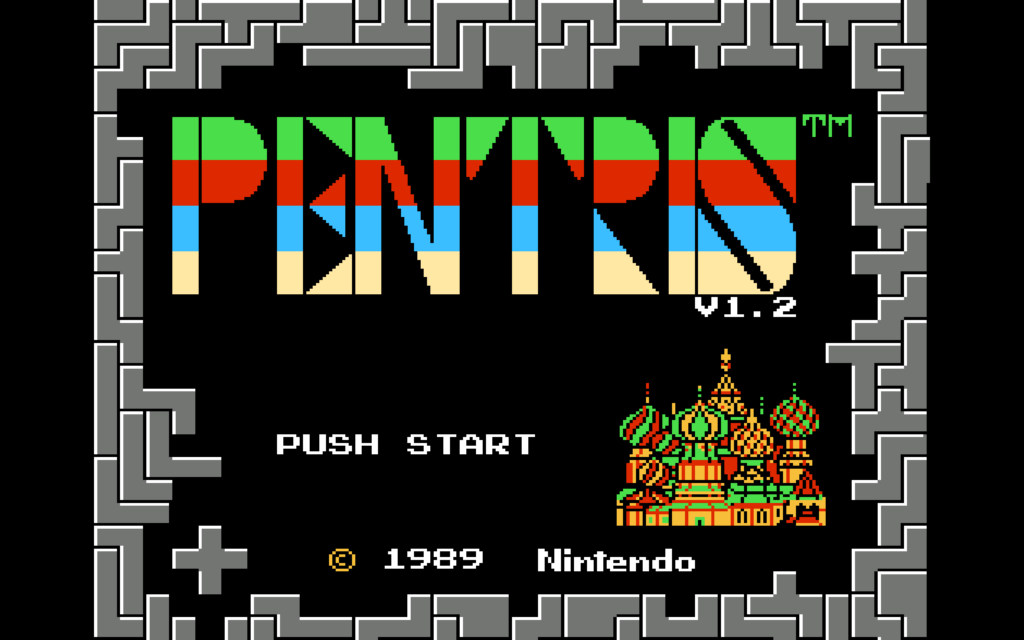
Well, why not try it for yourself, with today’s romhack: Zohassadar’s Pentris.

Pentris is built from Bullet-Proof Software’s NES version of Tetris (which is different from the Famicom version). It’s a BPS file, but there’s multiple utilities that can apply those, for Windows, Mac and Linux. For Win, Flips works well. Linux users may be able to find Flips in their distro’s repositories. For Mac, try Multipatch. The big advantage of BPS is that it contains CRCs of the original patch file to ensure that it’s working on its expected file, a continual problem with working with roms. As for where to get an original of NES Tetris from, you’re on your own.

Notably, Pentris is quite a bit harder than Tetris. It’s not kaizo hard though, it seems like it may be possible to have a lengthy game, but it’ll probably take you longer to develop a good intuition for what moves are good ones than it did for Tetris.

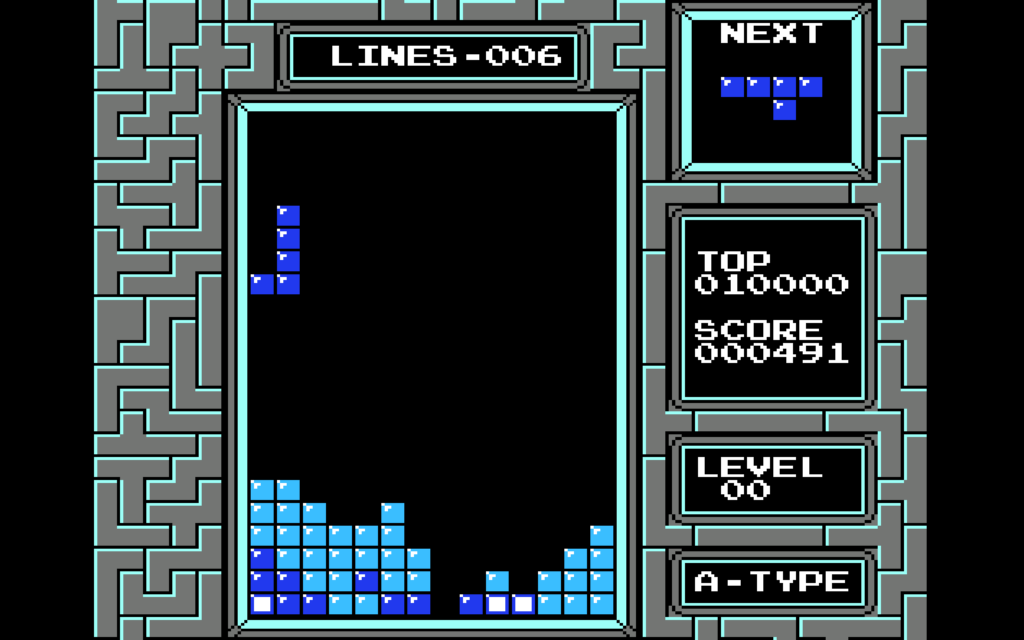
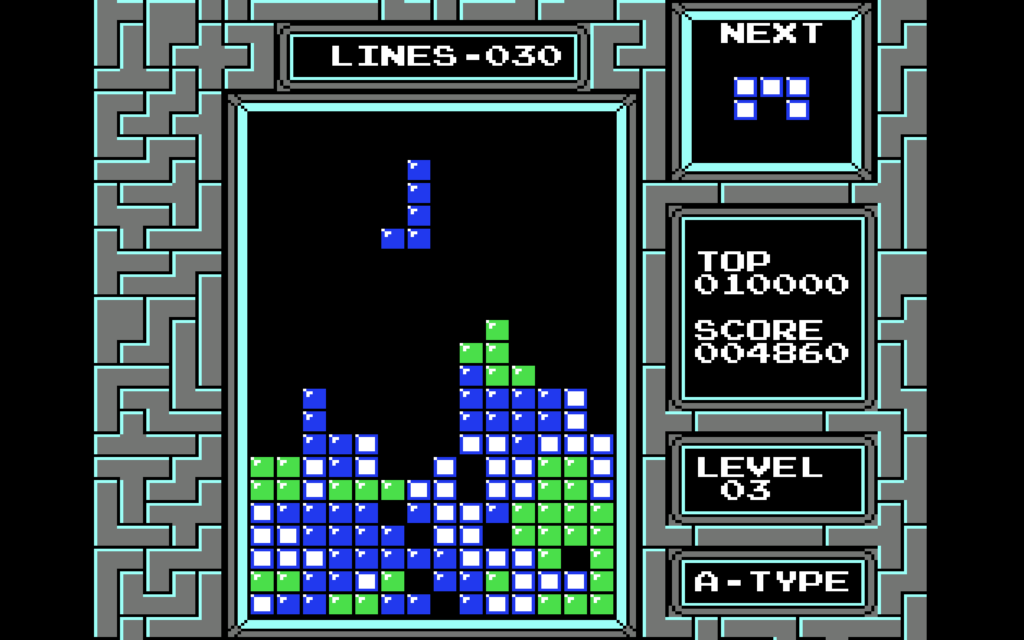
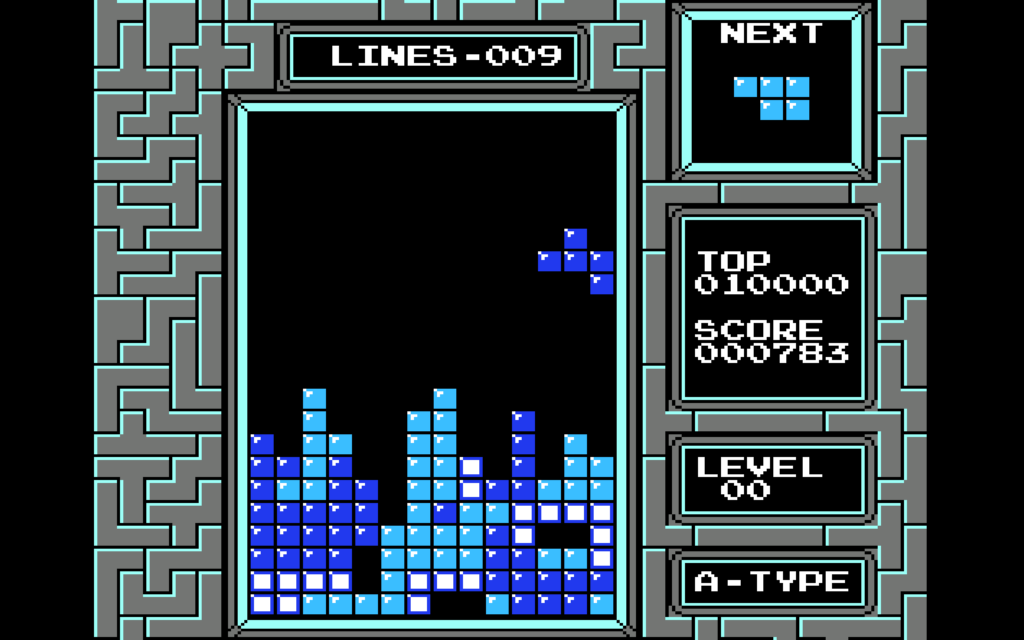
There are more possible pentominos than there are tetrominoes, so the long-piece is less common, and pentrises require five lines of setup instead of four, making them much harder to make than tetrises. In my several test games, I never managed to make even one. But mere survival is more difficult too. Pentris’ bin is 14 blocks wide instead of 10, which is more room to make mistakes. And some of its pieces are much more unwieldly than the worst of Tetris. Tetris has Z and S, but Pentris has Texas:

What are you supposed to do with this?

Pentris doesn’t appear to monkey with NES Tetris’ piece generation. The NES game picks pieces almost entirely randomly, rerolling just once if two of the same piece in a row is selected. More recent versions use “bag” systems that guarantee that you get all the possible pieces in a reasonable amount of time, but neither NES Tetris nor Pentris hold your hand like that. If you’re depending on a 1×5 piece but the RNG doesn’t feel like giving you one, you’re left to lump it.

In addition to that Texas abomination, there are also “long L” and “long J” pieces, and identical versions but with the extra square moved one space up the bar part, a piece that’s like half of a picture frame, and, invading from Rampart, the dreaded U and Plus shapes. Where you choose to place them, as they relentlessly fall, is up to you.

If you focus on survival you can advance a few levels. A good beginner’s score of Pentris is about 5,000 points. My highest so far is about 6,800. I don’t know how many points a pentris is worth, but if it scales like the multi-line clear points from Tetris did it’s probably very valuable.

I feel like I should mention there is at least one other game called Pentris around, a web game that doesn’t seem to be maintained too well. It has some of the same ideas behind it, but it also has other sized shapes too, including single blocks. I don’t know much about it, but I do know it is substantially a different game from the romhack Pentris.

Pentris (romhacking.net, somehow, still around!)

Brawl in the Family Compilation Kickstarter Nears Completion

Nominally about Smash Bros., its name just goes to show that classic gaming webcomic Brawl in the Family has been around a long time now. It started in 2008, and while it hasn’t published new cartoons since 2014, its creator Matthew “BitFinity” Taranto keeps making new content, some of which we’ve linked before, like Megalixir.

BitFinity has a Kickstarter going for an “ultimate” version of all the Brawl in the Family comics, and a wealth of additional material. It’s already made its base target and is chasing stretch goals now with five days to go. The next goal is new Brawl in the Family comics, and plenty of people would like to see that I think! Here’s a promotional video for it.

Matthew doesn’t know who the hell I am, but I enjoy his work, and I think you’ll enjoy it too, so please consider it? And one of the levels is a King Dedede-ish plush toy, and won’t that be nice to have and to hug?

Aww, he’s adawable.

That’s it for today. The search for interesting things to link stretches ever onward. See you tomorrow!

Amazing Next Fest Demos

This is part 6 of my favorite demos from next fest 2024.

0:00 Intro
00:20 Stonemachia
2:41 Letalis
4:34 Wild Woods
5:57 Strategem Lost
7:52 Everwarder
10:16 Bioweaver
12:16 Mother’s Sword
13:55 Unless
15:20 Break the Line
17:17 Heritage: A Dragon’s Tale
18:47 VinDefiant

original streams parts 1 and 2 .

DOOM: The Gallery Experience

Found by long-term MeFite Going To Maine, DOOM: The Gallery Experience is a DOOM mod that changes out all of its various elements for museum equivalents. Ammo becomes drinks from among Wine, Beer, Gin or “Watr”; Health has become Cash (which you can spend in the gift shop) and Armor becomes Cheese. (You still pick them up like powerups, though.) And there’s still secret passages to find. The map is generally the same as that as the first level from the shareware game, although the demons have been moved out and replaced with objets d’art, all of which can be examined for information on the work.

You can either play it yourself on Newgrounds, or get the general idea from this Youtube video (4 1/2 minutes):